# Zipper Overview

<figure><img src="/files/EfG2THP3V1GfAHCVnfKc" alt=""><figcaption></figcaption></figure>

### Vision

*To be the most secure, transparent, and efficient cross-chain asset gateway, enabling seamless interaction between external blockchains and the Fabric L1 while fostering trust through verifiable on-chain asset backing.*

***

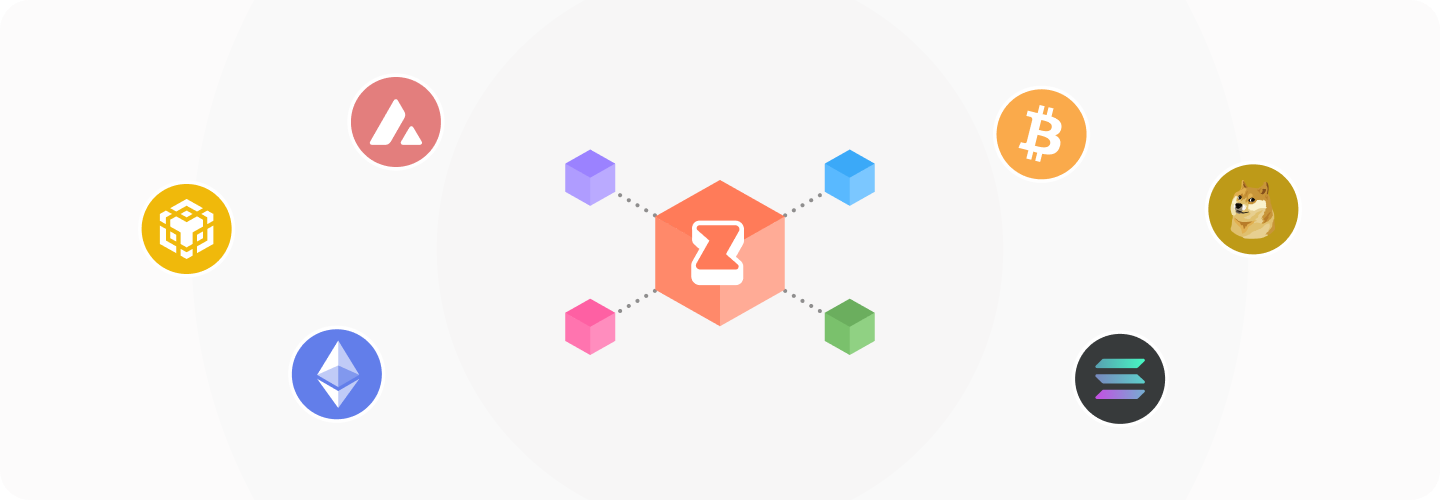
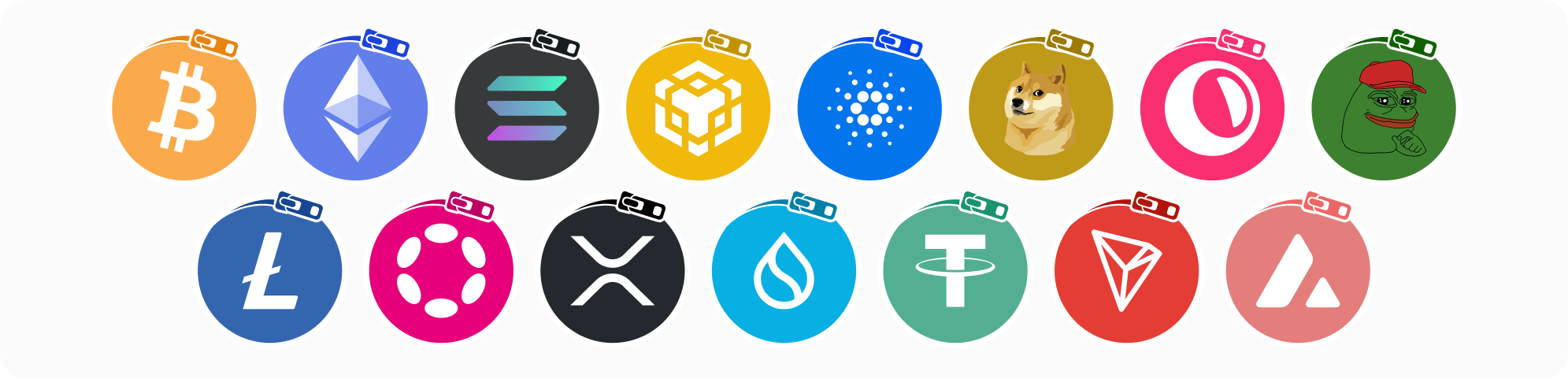
Zipper is a **decentralized protocol** within the **Fabric blockchain ecosystem** that facilitates the **zipping (wrapping) and unzipping** **(unwrapping)** of assets. It acts as a bridge for converting assets from most blockchains (such as **Bitcoin, Ethereum, Solana, Dogecoin, and Litecoin**) into **Fabric-compatible zAssets**. These **zAssets** are **fully backed 1:1** by their original assets and integrate with the Fabric ecosystem, creating new possibilities within **decentralized applications (dApps) and DeFi protocols**. **Zipper is the entrance to Fabric for external blockchain assets.**

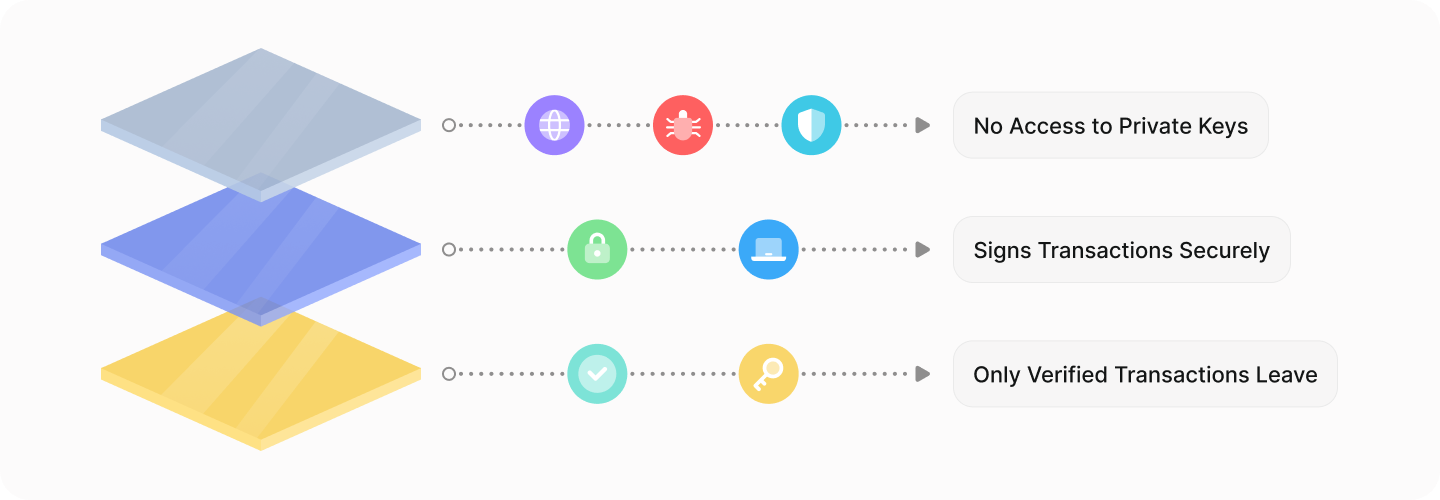
Using Zipper requires **depositing/withdrawing** assets to/from **vaults on the native chain** for the deposit/withdrawal asset. **Zipper controls these vaults** and keeps them secure using **Trusted Execution Environment (TEE) protocols**. Every deposit/withdrawal transaction is recorded on-chain for full transparency, both on the native chain and Fabric chain.

This protocol is, by design, **extremely straight forward**. By **solely focusing on zipping and unzipping**, Zipper maintains simplicity and reliability, providing users and developers with a **trusted way** to bring external assets into the Fabric ecosystem.

***

{% hint style="info" %}
New to the Fabric L1 ecosystem? Check out the [Fabric website](https://fabric.network) here.
{% endhint %}

The rest of the documentation will go into more detail about **zAssets**, guide users on **how to use Zipper,** and explains the use of **TEE** to **protect zipped (wrapped) funds**.


# Fabric Labs Ecosystem

<figure><img src="/files/jqiVYSZ8uP5L4S12QOlS" alt=""><figcaption></figcaption></figure>

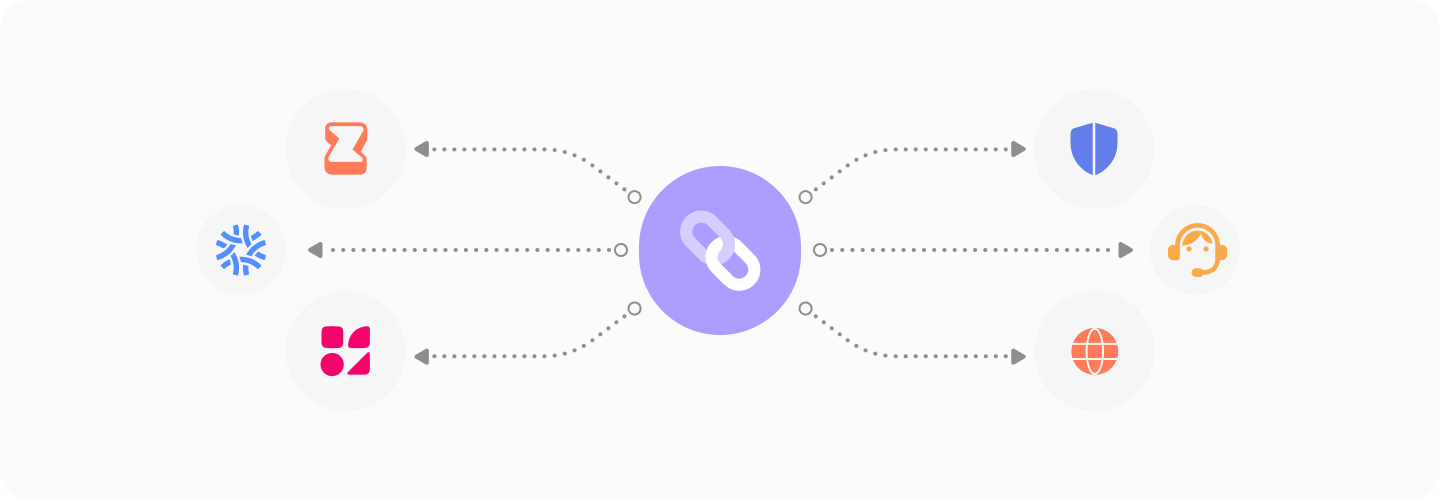
Fabric Labs is building the foundation for a secure, scalable, and efficient blockchain ecosystem. Designed to facilitate asset movement, decentralized trading, and developer innovation, Fabric brings together three core products that work in unison to enhance your blockchain experience.

The initial ecosystem is composed of three interconnected pillars:

* **Fabric Blockchain** - A high-performance Layer 1 blockchain that powers decentralized applications, cross-chain asset transfers, and a robust DeFi infrastructure.
* **Zipper** - The gateway for bringing external assets into Fabric. By securely wrapping assets from other blockchains into **zAssets**, Zipper enables cross-chain accessibility while maintaining full 1:1 asset backing.
* **Polyester** - A next-generation decentralized exchange (DEX) that combines deep liquidity, advanced trading tools, and an intuitive user experience while remaining fully decentralized.

Together, these products create a trustless, efficient environment where users can **wrap assets, trade confidently, and build freely**. Whether you're a trader, developer, or long-term ecosystem participant, Fabric provides the infrastructure to interact with digital assets effortlessly.


# Fabric

<figure><img src="/files/lsKUNqjHcr4vpGGOZXyL" alt=""><figcaption></figcaption></figure>

Fabric is an **AI-centric Layer 1 blockchain** designed to decentralize computation, enhance smart contract functionality, and integrate AI-driven reasoning into blockchain applications. It is **EVM-compatible, fast, and low-cost**, providing a scalable foundation for AI-powered dApps, DeFi protocols, and decentralized infrastructure.

At the core of Fabric is its **Micro-Networks** system, where nodes not only validate Fabric blocks but can also opt in to support **decentralized databases, autonomous servers and AI Agents**. With **built-in oracles that connect to OpenAI, xAI, web search and other AI services**, Fabric enables smart contracts to access real-time data and AI-powered decision-making, making blockchain applications more intelligent and capable than ever before.

***

#### **Fabric Network Details (Currently Fabric Testnet)**

To interact with the Fabric blockchain using MetaMask or any other Web3 wallet, you’ll need to manually add the network. Use the following details:

<table><thead><tr><th width="178.2109375">Name</th><th width="289.51953125">Value</th></tr></thead><tbody><tr><td><strong>Network Name:</strong></td><td>Fabric Testnet</td></tr><tr><td><strong>RPC URL:</strong></td><td><code>rpc.fabriclabs.org</code></td></tr><tr><td><strong>Chain ID:</strong></td><td><code>1584821</code></td></tr><tr><td><strong>Currency Symbol:</strong></td><td><code>tFAB</code></td></tr><tr><td><strong>Block Explorer URL:</strong></td><td><code>scan.fabriclabs.org</code></td></tr></tbody></table>

**How to Add Fabric to MetaMask:**

1. Open **MetaMask** and navigate to the **network selector dropdown** in the top-left corner.
2. Click on **"Add a custom network"** at the bottom of the dropdown.
3. Enter the Fabric network details above and click **Save**.
4. Switch to the **Fabric network** in MetaMask and start interacting!


# Polyester

<figure><img src="/files/meUuI7fp6CikLUgoepSt" alt=""><figcaption></figcaption></figure>

Polyester is a **decentralized exchange (DEX)** built within the Fabric blockchain ecosystem, designed to provide **deep liquidity, advanced trading tools, and a friendly user experience**. Unlike traditional AMM-based DEXs, Polyester operates with an **order book system**, offering traders the precision and efficiency of centralized exchanges while remaining fully decentralized.

With **zero reliance on liquidity pools**, Polyester eliminates impermanent loss risks while enabling features like **limit orders, time-weighted average pricing (TWAP), and institutional-grade execution tools**. By leveraging Fabric’s low-cost, high-speed architecture, Polyester creates an optimal trading environment for retail users, algorithmic traders, and institutional participants alike.


# Zipper

<figure><img src="/files/ubNtwD7ujuEpNrYrIdfw" alt=""><figcaption></figcaption></figure>

Zipper is a **decentralized asset zipping (wrapping) protocol** that enables users to convert assets from external blockchains - such as Ethereum, Solana, Dogecoin, and Litecoin - into **Fabric-compatible zAssets**. Each zAsset is fully backed 1:1 by its original counterpart, ensuring security, transparency and accessibility within the Fabric ecosystem.

By focusing solely on **zipping (wrapping) and unzipping (unwrapping) assets**, Zipper provides a **simple, efficient, and trustless** gateway into Fabric. Secure on-chain vaults, real-time transparency, and compliance measures ensure that every zipped asset remains fully collateralized, giving users confidence when bringing liquidity into the Fabric network.


# Key Features and Benefits

1. #### **Asset Wrapping(Zipping) and Unwrapping(Unzipping)**

   Zipper provides a seamless process to convert external assets (e.g., ETH, USDT, Solana, Doge, Litecoin, etc) into Fabric-compatible zAssets. These zAssets can then be used within the Fabric ecosystem, unlocking broader utility and functionality.
2. **On-Chain Vaults**

   All original assets are securely stored in decentralized on-chain vaults. This ensures full transparency, traceability, and confidence in the safety of user funds.
3. **1:1 Minting Model**

   Zipper employs a simple 1:1 minting mechanism. For every external asset deposited into a vault, an equivalent amount of zAssets is issued, maintaining a precise balance and simplifying the user experience.
4. **Fabric-Compatible zAssets**\
   zAssets issued by Zipper are fully interoperable within the Fabric ecosystem, allowing users to engage with decentralized applications (dApps) and protocols built on Fabric.


# What are zAssets?

<figure><img src="/files/RoXeCcAFcVOBcmOabPjn" alt=""><figcaption></figcaption></figure>

### Important Clarification Note

zAssets is a placeholder term we use throughout this documentation to represent wrapped assets on Fabric. Each zAsset corresponds to a specific asset from an external blockchain that has been securely zipped (wrapped) into Fabric’s ecosystem. For example, Ethereum’s USDT becomes zUSDT, and Bitcoin becomes zBTC. The term 'zAssets' is used throughout this documentation as a general reference to all Fabric-compatible wrapped assets. However, each token retains its unique ticker (e.g., zUSDT, zETH) after zipping.

### **What Are zAssets?**

zAssets are Fabric-compatible, tokenized representations of external blockchain assets created through the Zipper protocol. These zipped (wrapped) assets maintain a 1:1 backing with their original counterparts, securely stored in Zipper’s on-chain vaults. By converting assets from various blockchains into zAssets, users can interact with Fabric-based decentralized applications (dApps) and DeFi protocols.

### Differentiation By Chain

Every zAsset on Fabric corresponds to a specific asset from an external blockchain. For accurate traceability, Zipper assigns a unique contract address on Fabric for each originating blockchain’s asset. This system allows users to differentiate between zAssets from different chains, even if they share the same ticker symbol. A great example of this is USDT, which exists on many chains.

There is only one USDT on each individual chain, but on Fabric, all USDTs will co-exist, so they must be differentiated to avoid confusion, mitigate impostor contracts and similar mischievous behavior. <br>

* **Contract Verification:**
  * The UI throughout the Fabric ecosystem will indicate and guide users to easily identify proper tokens and avoid scams.
  * **Users are still recommended to get familiar with where to verify the contract addresses of their zAssets.** The easiest way to do this is by visiting [**FabricScan**](https://scan.fabriclabs.org/), which provides a dedicated token page for each zAsset. Here, users can check its contract address on Fabric and confirm its original source blockchain. Always compare contract addresses to ensure you are interacting with the correct asset.
* Why Differentiation Matters:
  * **Avoiding Confusion**: Every zAsset has a unique contract address on Fabric that corresponds to its original blockchain. This ensures users can trace the source of their assets, verify their 1:1 backing, and prevent confusion between identical tickers from different chains.
  * **Security**: Helps prevent fraudulent transactions or misuse of impostor contracts and unverified assets within the ecosystem.

***

To better understand an example of a zAsset and chain differentiation, here's an example case explained using USDT:

* **Chain-Specific Contracts**:
  * Each external chain’s asset is mapped to a unique contract on Fabric. There are no assets that will share the same Fabric contract, even if they share the same ticker outside of Fabric.
  * Example:
    * USDT (based on Ethereum blockchain)
      * Original Contract: `0xdAC17F958D2ee523a2206206994597C13D831ec7` (Ethereum).
      * &#x20;Fabric Contract: zUSDT (Ethereum) not live on Fabric mainnet yet.
      * Ticker on Ethereum: USDT
      * Ticker on Fabric: zUSDT
    * USDT (based on Solana blockchain)
      * Original Contract: `Es9vMFrzaCERmJfrF4H2FYD4KCoNkY11McCe8BenwNYB` (Solana)
      * Fabric Contract: zUSDT (Solana) not live on Fabric mainnet yet.
      * Ticker on Solana: USDT
      * Ticker on Fabric: zUSDT
  * Both are labeled zUSDT in a wallet app like Metamask, but are distinguishable via their respective Fabric and originating chain contract addresses.

{% hint style="warning" %}
Reminder: While Zipper ensures accurate chain differentiation with unique contracts, it does not verify the legitimacy of the assets themselves. Zipper’s sole purpose is to zip and unzip assets. Asset verification is handled by other applications, such as Polyester.
{% endhint %}

{% hint style="info" %}
zAssets maintain fully collateralized 1:1 backing and are traceable via [FabricScan](https://scan.fabriclabs.org/).
{% endhint %}


# What To Do With zAssets?

<figure><img src="/files/W7Gq5ILe8NlLPoRrHlCJ" alt=""><figcaption></figcaption></figure>

Once an asset has been **zipped** through Zipper, it becomes a **Fabric-native zAsset**, unlocking new opportunities within the ecosystem. Whether you’re looking to trade, interact with decentralized applications, or simply hold assets on Fabric, zAssets provide a **versatile foundation for expanded utility**.

***

#### **Trading on Polyester**

zAssets can be traded on **Polyester**, Fabric’s decentralized exchange (DEX). Unlike traditional AMM-based DEXs, Polyester operates with an **order book system**, enabling advanced trading features like **limit orders, TWAP execution, and institutional-grade market tools**.

Since all assets on Fabric exist as **zAssets**, users can trade **zBTC, zDOGE, zXRP, and other tokenized versions of external assets**, which are **backed 1:1** by their original counterparts. Unlike other DEXs that primarily support ERC-20 assets, Polyester allows trading pairs that include **major non-EVM assets** in a fully decentralized manner - without relying on liquidity pools.

***

#### **Using zAssets in Fabric dApps**

Beyond trading, zAssets are designed to be a **core building block for decentralized applications on Fabric**. As the ecosystem evolves, developers and community members can create new use cases for zAssets, including possibilities like **lending, staking and on-chain yield strategies**. The **Fabric blockchain is permissionless**, meaning anyone can deploy smart contracts and build applications that integrate zAssets in innovative ways.

If you're a developer, now is the time to explore **building on Fabric** and leveraging zAssets to power **new DeFi models, AI-driven contracts, and autonomous dApps**.

***

#### **Unzipping & Exiting Fabric**

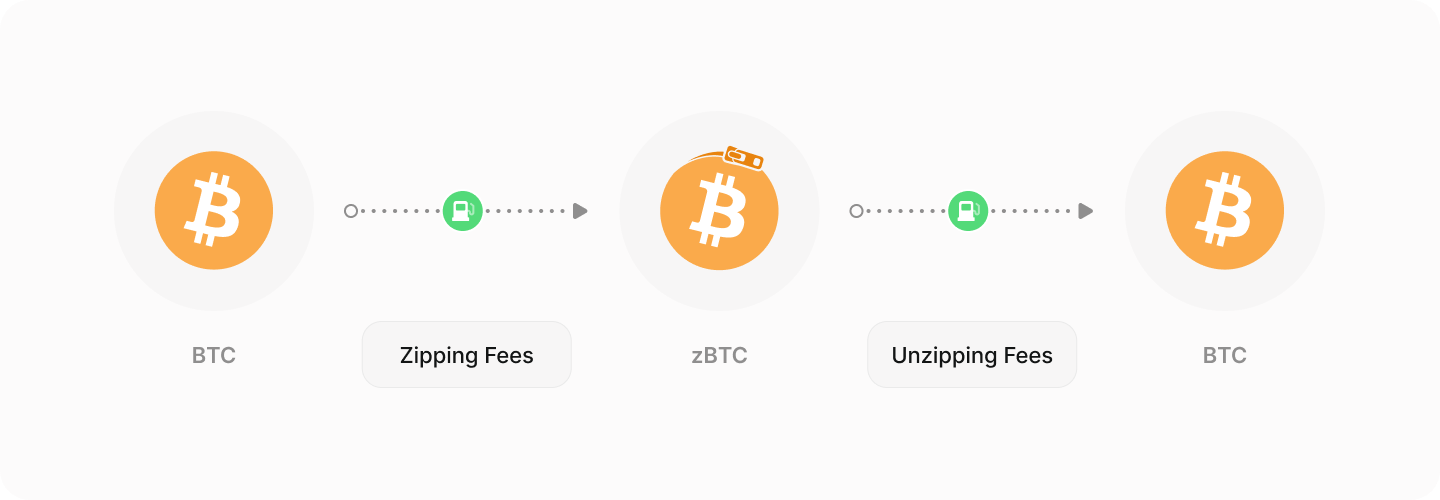
If users ever want to return their assets to their original blockchain, they can **initiate an unzipping transaction** through Zipper. This process burns the zAsset on Fabric and **releases the original asset back to the user’s wallet** on the external chain, ensuring a **trustless and verifiable** 1:1 exchange.

***

#### **Beyond DeFi: The Future of zAssets**

The possibilities for zAssets extend far beyond trading and DeFi. **With real-time information, AI-driven automation, and Fabric’s decentralized computing capabilities**, entirely new applications can be built that go beyond what’s possible on traditional blockchains. The combination of **programmable assets, AI Agents, and smart contract logic** could lead to **financial applications, autonomous marketplaces, and Web3 innovations that have yet to be explored.**

Developers and innovators will shape the next phase of the Fabric ecosystem, using zAssets in ways that push the boundaries of blockchain technology.


# What Is Zipping/Unzipping?

<figure><img src="/files/mrcgUedlijuplowFQAXa" alt=""><figcaption></figcaption></figure>

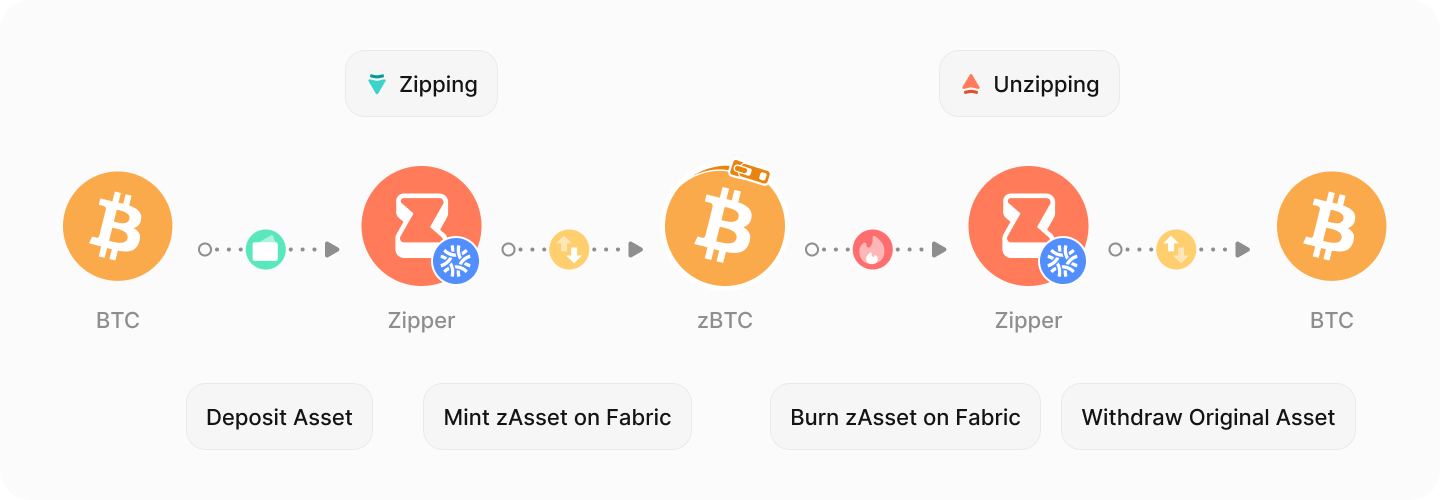
Zipping and unzipping are the core functions of **Zipper**, allowing users to move assets between external blockchains and the **Fabric ecosystem** in a **trustless, transparent and fully collateralized** manner.

### **Zipping: Converting an External Asset into a zAsset**

Zipping is the process of **depositing an asset from an external blockchain** into Zipper’s on-chain vaults that is located on the respective chain and **minting a corresponding zAsset on Fabric**. This process ensures that for every **zAsset on Fabric, there is an equivalent real asset securely stored in a vault** on the original blockchain.

**How It Works:**

1. The user initiates a **zip request**, which provides them with a **deposit address** for the asset they are sending (e.g., an Ethereum address for zipping USDT from the Ethereum network).
2. The user sends their asset (e.g., USDT from Ethereum) to this **deposit address**.
3. Once the deposit is confirmed on the external blockchain, Zipper **mints an equal amount of zUSDT on Fabric** and sends it to the user’s Fabric wallet.
4. The original asset remains securely stored in the vault until a user decides to unzip zUSDT.

At this point, the user can **freely use zAssets within the Fabric ecosystem**, such as trading on **Polyester** or interacting with Fabric-based dApps.

### **Unzipping: Converting a zAsset Back to Its Original Form**

Unzipping is the **reverse process**, allowing users to **redeem their original asset** by burning the corresponding zAsset on Fabric. This permanently removes the zAsset from circulation and **releases the original asset back to the user’s designated wallet on its native blockchain**.

**How It Works:**

1. The user initiates an **unzip request**, which provides them with a **withdrawal address on Fabric** for the zAsset they need to send.
2. The user sends their zAsset (e.g., zBTC) to the **withdrawal address** on Fabric.
3. Once the zAsset is received, it is **burned**, meaning it is permanently removed from the Fabric network.
4. The original BTC is then **withdrawn from Zipper’s on-chain BTC vault** and sent to the user’s Bitcoin wallet.

This mechanism ensures that **each zAsset is always fully backed by its real counterpart** and prevents inflation or manipulation of the supply.

#### **Trustless & Transparent by Design**

Zipper ensures that every zipping and unzipping transaction is **fully recorded on-chain**, making the entire process **verifiable, secure and decentralized**. Users can check their transactions and verify contract addresses through [**FabricScan**](https://scan.fabriclabs.org/).


# What Are On-Chain Vaults?

<figure><img src="/files/V10sxQye5UFoRfcSDNhT" alt=""><figcaption></figcaption></figure>

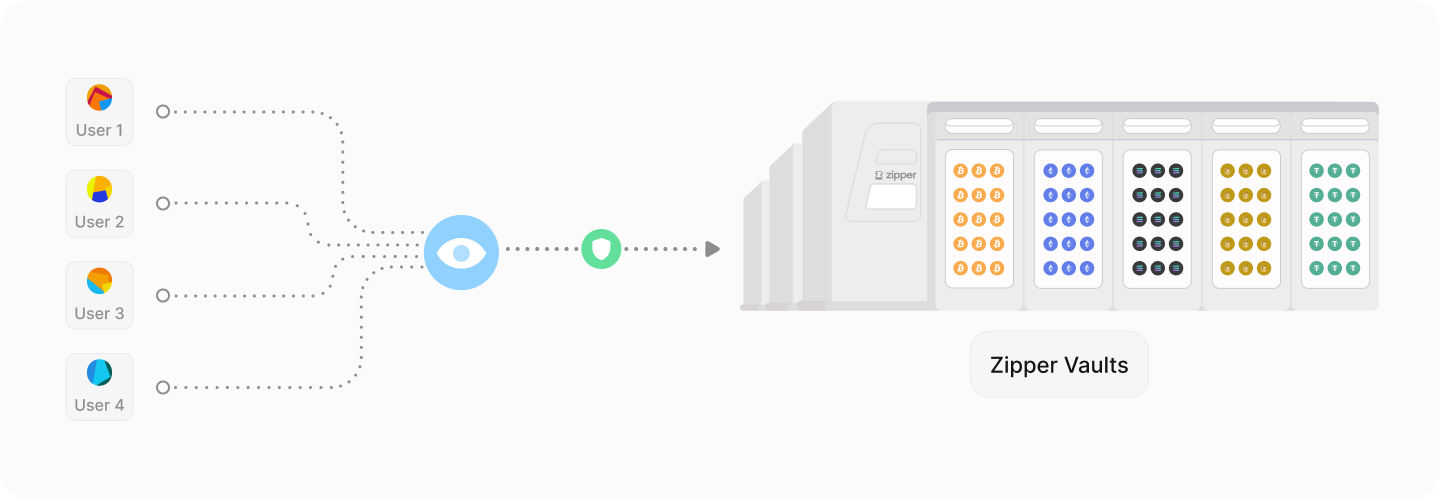
On-chain vaults are the **core security mechanism** of Zipper, ensuring that every **zAsset on Fabric is fully backed 1:1 by its real counterpart** on its original blockchain. These vaults function as **transparent, decentralized storage** locations where users’ deposited assets remain securely held while their zAsset equivalent exists on Fabric.

#### **How Vaults Secure Funds**

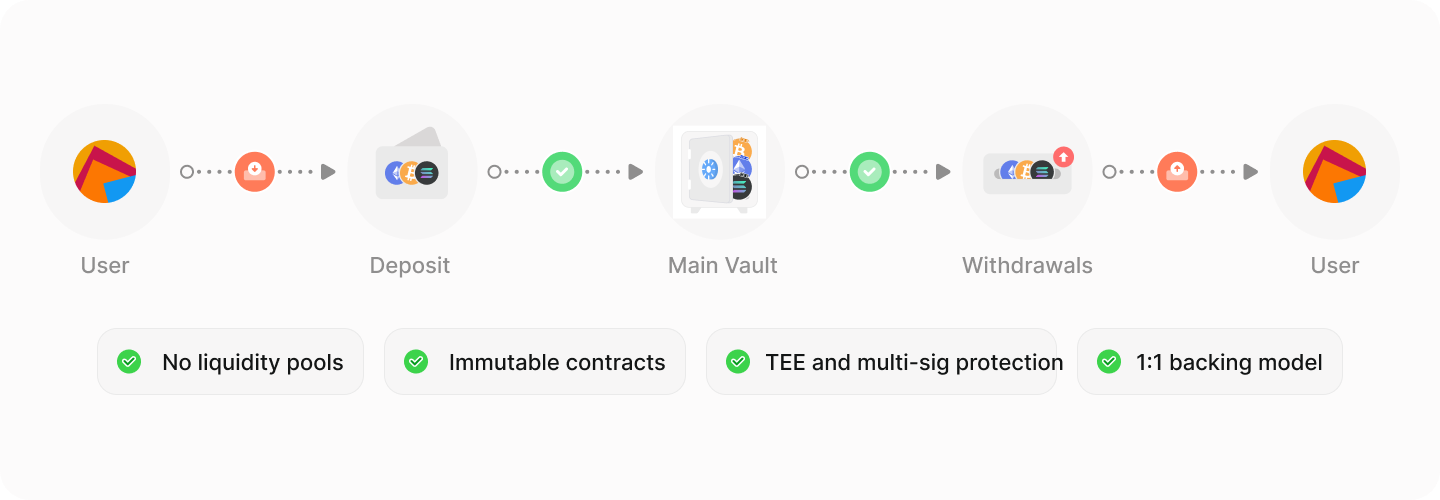
Each external blockchain has a **dedicated vault** controlled by Zipper. When a user **zips an asset**, it is **deposited into the vault**, and a corresponding **zAsset is minted** on Fabric. When a user **unzips**, the corresponding zAsset is **burned**, and the original asset is **released from the vault** back to the user.

Vaults ensure:\
✅ **1:1 Backing** - Every zAsset on Fabric corresponds exactly to an asset stored in an on-chain vault.\
✅ **Trustless Security** - Users can verify the vault’s balance **on-chain** at any time.\
✅ **No Liquidity Pools** - Vaults are not used for lending or staking; funds remain **secure and untouched** until a user requests a withdrawal.

#### **Multi-Signature & TEE Security**

To prevent **single points of failure**, Zipper secures its vaults using a **multi-signature (multi-sig) model** combined with **Trusted Execution Environment (TEE) technology**.

* **Multi-Sig Protection** - Vault transactions require multiple signatures, ensuring that no single entity has full control over user funds.
* **TEE Security Model** - Trusted Execution Environments protect vault private keys, ensuring that **even Zipper’s operators cannot unilaterally access or move funds**.

This **redundant security architecture** ensures that **even in extreme scenarios, funds remain fully protected**.

#### **Full Transparency & Public Verification**

Zipper’s vaults are **completely auditable**, and users can verify:

* The total balance of assets stored in vaults.
* The contract addresses of zipped and unzipped assets.
* The history of deposits and withdrawals.

Users can **track all vault activity directly on-chain** using [**FabricScan**](https://scan.fabriclabs.org/) and block explorers for each original blockchain.

#### **Zipper’s Role in Vault Management**

Zipper **only facilitates vault deposits and withdrawals -** it does not verify asset legitimacy. The **best way for users to verify assets** is to **check contract addresses during the Zipping process and use FabricScan for confirmation**.


# What Is Zipping/Unzipping?

Zipper enables users to securely convert assets from external blockchains into Fabric-compatible zAssets (wrapping) and return zAssets back to their original form (unwrapping). This process is simple, efficient, and fully backed 1:1 by the original asset.

#### **Wrapping (Zipping)**

Wrapping transforms assets from external blockchains into Fabric-compatible zAssets.

**How It Works - Summary**

1. **Deposit**: The user deposits their external blockchain asset (e.g., ETH or USDT) into Zipper’s secure on-chain vault.
2. **Minting**: Zipper mints an equivalent amount of zAssets on Fabric (e.g., zETH or zUSDT) and transfers them to the user’s Fabric wallet.
3. **Traceability**: The original asset is stored in a multi-signature vault, and the zAsset is linked to both its Fabric and original chain contract addresses.

**Example**

* The user deposits 10 USDT from Ethereum into Zipper.
* Zipper mints 10 zUSDT on Fabric and sends it to the user’s wallet.

{% hint style="info" %}
include a gif of an asset getting zipped and unzipped
{% endhint %}

***

#### **Unwrapping (Unzipping)**

Unwrapping converts Fabric-compatible zAssets back into their original external blockchain assets.

**How It Works - Summary**

1. **Send zAssets**: The user sends their zAssets (e.g., zETH or zUSDT) to Zipper.
2. **Burning**: Zipper burns the zAssets, removing them from circulation on Fabric.
3. **Withdrawal**: The original asset is released from the vault on the respective external blockchain and sent to the user’s external blockchain wallet.

**Example**

* The user sends 10 zUSDT(Ethereum based) to Zipper.
* Zipper burns the 10 zUSDT and sends 10 USDT back to the user’s Ethereum wallet.


# Compliance and Security Measures

#### **Compliance Measures**

1. **Chain Monitoring**:
   * Zipper integrates with chain monitoring companies to prevent interactions with:
     * Sanctioned wallets (e.g., OFAC-listed addresses).
     * Wallets flagged for theft or illicit activity.
   * Transactions associated with such wallets are flagged and blocked during the wrapping or unwrapping process.
2. **No Minimum Asset Requirements**:
   * Users can wrap or unwrap any amount, as long as they cover the associated network fees. This ensures accessibility for all users.
3. **Transaction Validation**:
   * Zipper validates all transactions for security and legitimacy. If a transaction is flagged for compliance, it may experience slight delays while undergoing additional checks.

***

#### **Security Measures**

1. **Vault Protection**:
   * Original assets are stored in multi-signature wallets, managed with a Trusted Execution Environment (TEE) protocol. This ensures no single entity can access the vault’s keys.
   * Vault operations are designed to assume all entities are potential bad actors, maximizing security.
2. **On-Chain Transparency**:
   * All transactions, including wrapping and unwrapping, are recorded on-chain. Users can verify the contract addresses for their zAssets and their corresponding original assets.
3. **Redundancy Mechanisms**:
   * Zipper incorporates safeguards to handle unexpected network or vault issues, ensuring uninterrupted operations and asset security.


# What Are On-Chain Vaults?

Zipper uses secure on-chain vaults to store original assets backing zAssets. These vaults are designed with advanced security measures to ensure user funds are protected and fully collateralized.

#### **How On-Chain Vaults Work**

1. **Secure Storage**:
   * When users wrap (zip) assets, the original tokens are deposited into Zipper’s multi-signature wallets.
   * These wallets are managed using a Trusted Execution Environment (TEE) protocol, ensuring that no single entity, including key custodians, can access or assemble the private keys.
2. **1:1 Backing**:
   * Every zAsset minted on Fabric corresponds to an equal amount of the original asset held in the vault. For example:
     * 10 zETH on Fabric = 10 ETH stored in Zipper’s vault.
3. **Transparent Operations**:
   * All vault transactions are recorded on-chain. Users can verify the status of their wrapped assets and the vault’s holdings at any time via FabricScan.

***

#### **Key Features**

1. **Multi-Signature Architecture**:
   * Requires multiple approvals for any asset withdrawal from the vault, preventing unauthorized access.
2. **TEE Protocol**:
   * Ensures the private keys for the multi-signature wallets are fragmented and never assembled by a single entity, even during transaction approval.
3. **Auditability**:
   * The vault’s on-chain nature allows users and third-party auditors to verify holdings and transactions in real-time.

***

#### **Security Measures**

1. **Risk Mitigation**:
   * By decentralizing key management and requiring multi-signature approvals, the vault system reduces risks like unauthorized withdrawals or insider attacks.
2. **Redundancy**:
   * Backup systems and contingency plans are in place to handle network issues or unexpected failures.


# Multi-Signature Wallets and TEE Protocol

**Multi-Signature Wallets**

* **Definition**: Multi-signature (multi-sig) wallets require multiple authorized signatories to approve any transaction or withdrawal. This ensures that no single entity has complete control over the vault.
* **Key Features**:
  1. **Decentralized Control**: Spreads control across multiple parties to minimize single points of failure.
  2. **Enhanced Security**: Even if one signatory’s keys are compromised, funds remain secure as additional approvals are required.

***

**Trusted Execution Environment (TEE) Protocol**

* **Purpose**: Ensures private keys for multi-signature wallets are never fully assembled or accessible by a single party.
* **How It Works**:
  1. **Key Fragmentation**: Private keys are split into fragments and stored securely across multiple nodes.
  2. **Execution**: When a transaction is initiated, the TEE protocol facilitates the necessary signatures without exposing or combining the keys.
  3. **Bad Actor Assumption**: The system operates under the assumption that any party could be compromised, ensuring robust fail-safes.

***

#### **Benefits of This Approach**

1. **Minimized Risk**:
   * Prevents unauthorized access, even in the case of partial system compromise.
2. **Transparency**:
   * All transactions requiring multi-signature approvals are recorded on-chain for verification.
3. **Trust**:
   * By decentralizing key control and securing them with TEE, Zipper ensures maximum reliability for users.


# Navigating Zipper.Trade

<figure><img src="/files/OEA3wCabwgDxEZlzYF0l" alt=""><figcaption></figcaption></figure>

Zipper’s homepage provides a streamlined interface for accessing key protocol features, exploring asset activity, and managing transactions. The header bar contains essential navigation options to help users interact with the platform efficiently.

### **App**

The **App** section is the core of Zipper, where users can actively **zip and unzip assets** on Fabric. After connecting their wallet, users can:

* View their **profile and transaction history**
* **Deposit (zip) and withdraw (unzip) assets**
* Track their **Zipper activity in real time**

This is the primary location for interacting with the Zipper protocol.

### **Explore**

The **Explore** section provides a **detailed overview of Zipper’s activity**, including:

* **Total Value Locked (TVL) and total volume** across the protocol
* Chain-specific **TVL, volume, and recent transactions**
* Token-specific **metrics for individual assets**

Users can **search for specific tokens or blockchains** to dive deeper into asset performance and transaction data.

### **Docs**

The **Docs** button directs users to this documentation, where they can learn more about **how Zipper works, how to zip and unzip assets, and technical/security details**.

### **Search Bar**

The **search bar** is tied to the **Explore** section, allowing users to **quickly find information about a token or chain**. Entering a query will take users directly to the corresponding page, displaying **TVL, volume, and recent transaction data** for the selected asset or blockchain.

### **Connect Wallet**

The **Connect** button allows users to **link their wallet** to Zipper, enabling them to **interact with the protocol, deposit/withdraw assets, and track their activity**. The next page has more details about Connecting your Wallet.


# Connecting Your Wallet

<figure><img src="/files/PuB0aNiVrOJfjVgQUE6n" alt=""><figcaption></figcaption></figure>

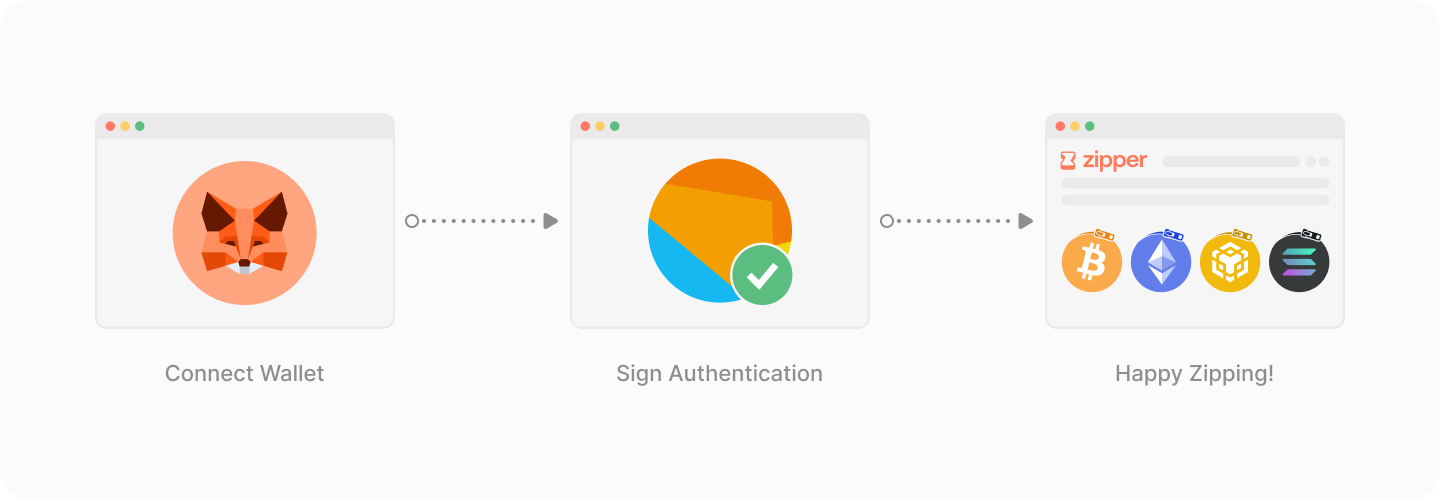
To interact with **Zipper**, you need to **connect a Fabric-compatible wallet**. This connection allows you to **zip and unzip assets, view your transaction history, and manage your Zipper account**.

{% hint style="warning" %}
**Note:** While this guide focuses on **MetaMask**, the process is relatively similar for other supported wallets.
{% endhint %}

### **Before You Connect**

Zipper operates **on the Fabric blockchain**, meaning your wallet **must be connected to Fabric** to interact with the protocol. If you haven’t added **Fabric to MetaMask**, follow the steps below.

***

### **Step 1: Add Fabric Testnet Network to MetaMask**

If you haven't added Fabric yet, you can do so manually:

1. **Open MetaMask** in your browser.
2. Click on the **network selector dropdown** in the top-left corner. (It typically displays "Ethereum Mainnet" by default.)
3. Click on **"Add a custom network"** at the bottom of the dropdown.
4. Enter the **Fabric Testnet network details**:
   * **Network Name:** Fabric Testnet
   * **New RPC URL:** `rpc.fabriclabs.org`
   * **Chain ID:** `1584821`
   * **Currency Symbol:** `tFAB`
   * **Block Explorer URL:** `scan.fabriclabs.org`
5. Click **"Save"** to add the Fabric Testnet network.
6. To switch to the Fabric network, click on the **network selector dropdown** again and select **"Fabric Testnet"** from the list.

### **Step 2: Connecting Your Wallet to Zipper**

Once your wallet is set to the **Fabric network**, follow these steps to connect:

1. Click **"Connect Wallet"** in the Zipper **header bar**.
2. Select **MetaMask** from the list of available wallets.
3. A **MetaMask pop-up will appear**, asking for permission to connect to **Zipper.trade**.

{% hint style="success" %}

#### **Is Connecting Safe?**

✅ Connecting your wallet **only grants read access -** Zipper **cannot move funds** without your explicit approval. ✅ Always **verify the website URL** ([**https://zipper.trade**](https://zipper.trade)) to avoid phishing attempts.
{% endhint %}

4. Click **"Connect"** to proceed.

### **Step 3: Signing the Authentication Request**

After connecting, **MetaMask will prompt you to sign a message**. This is a **signature request**, which helps verify your ownership of the connected wallet.

{% hint style="success" %}

#### Why is this safe?

* This **does NOT initiate a blockchain transaction** or incur gas fees.
* It is **purely for authentication** to link your wallet to your Zipper account.
  {% endhint %}

Click **"Sign"** to complete the login process.

### **Step 4: Accessing Your Zipper Account**

Once signed in, clicking on **"App"** will reveal:&#x20;

✔ Your **Zipper transaction history**&#x20;

✔ **Deposit & withdrawal options**&#x20;

✔ Your **Zipped assets on Fabric**

You are now **ready to begin zipping and unzipping**, which is explained in detail on the **next page**.


# Zipping: Step-by-Step

Below is a detailed walkthrough of the zipping and unzipping processes in Zipper. Use this guide to confidently interact with the protocol.

***

{% hint style="info" %}
video showing flow
{% endhint %}

#### **Wrapping (Zipping)**

{% tabs %}
{% tab title="Via Zipper.trader" %}
**How to Wrap Assets**

1. **Access Zipper**:
   * Visit the Zipper Website \[or access Zipper functionality via the Polyester exchange.]
2. **Connect Your Fabric Wallet**:
   * Use a Fabric-compatible wallet and ensure you have the original asset (e.g., ETH, USDT) ready for wrapping.
   * Connect wallet to Zipper.trade
3. **Go to the app**
4. **Select the Asset**:
   * Choose the asset and originating chain (e.g., USDT from Ethereum).
5. **Find the deposit address**:
   * The deposit wallet address is assigned to your Fabric wallet. Assets from the respective chain that are sent to that deposit wallet will get zipped and send to your Fabric wallet that is connected to Zipper.
6. **Review the transaction**:
   * Review the transaction details, including fees and the resulting zAsset (e.g., zUSDT).
   * Double check all assets and chain selected.
7. **Monitor the transaction**:
   * Use zipper's transaction section to monitor progress of the deposit after you send the assets to the deposit address.
8. **Receive zAssets**:
   * The wrapped zAssets are sent to your Fabric wallet, and the original asset is securely stored in Zipper’s vault.
     {% endtab %}

{% tab title="Via Polyester" %}

{% endtab %}
{% endtabs %}

***

#### Unwrapping (Unzipping)

{% tabs %}
{% tab title="Via Zipper.trade" %}
**How to Unwrap Assets**

1. **Access Zipper**:
   * Visit the Zipper Website or Polyester exchange to initiate unwrapping.
2. **Connect Your Wallet**:
   * Use a Fabric-compatible wallet containing the zAssets you want to unwrap.
3. **Select the zAsset**:
   * Choose the zAsset to unwrap. Zipper will display the originating chain and addresss(e.g., zUSDT on Fabric for Ethereum-originating USDT).
4. **Input the receiving wallet address**:
   * This wallet will be where the original assets will be sent to from the vault on the respective chain that you are unzipping to. Please double check you are submittting the correct address on the correct chain. Funds will be unrecoverable if done incorrectly.
5. **Enter the amount to unzip**
6. **Confirm the Transaction**:
   * Review the transaction details, including fees and the resulting original asset.
   * Approve the transaction in your wallet.&#x20;
7. **Zassets will be burned**:
   * The Zasset being unzipped will be removed from your Fabric wallet and burned.
8. **Monitor the Transaction**:
   * Use zipper's transaction section to monitor progress of the withdrawal after you submit the transaction and the zassets are burnt.
9. **Receive Original Assets**:
   * The original asset is released from Zipper’s vault and sent back to your external wallet that you input in step #4
     {% endtab %}

{% tab title="Via Polyester" %}

{% endtab %}
{% endtabs %}

***

#### **Tips for a Smooth Experience**

* **Ensure Sufficient Network Fees**:
  * Have enough native cryptocurrency (e.g., ETH, SOL, FAB) in your wallet to cover gas fees.
* **Verify Contract Addresses**:
  * Check the contract addresses for your zAssets and their original counterparts via the Zipper search tool.
* **Monitor Transaction Status**:
  * Use FabricScan or the original chain’s block explorer to track your transaction.


# Zipping: Step-by-Step

<figure><img src="/files/foykTfMUPEgBSMkCOW5b" alt=""><figcaption></figcaption></figure>

{% hint style="warning" %}
**Before You Begin:** This guide assumes you have already **added the Fabric network to MetaMask** and are **connected to Zipper.trade**. **If you haven’t completed these steps, please visit Connecting Your Wallet** on the previous page for instructions.
{% endhint %}

### **Step 1: Access the Deposit Tab**

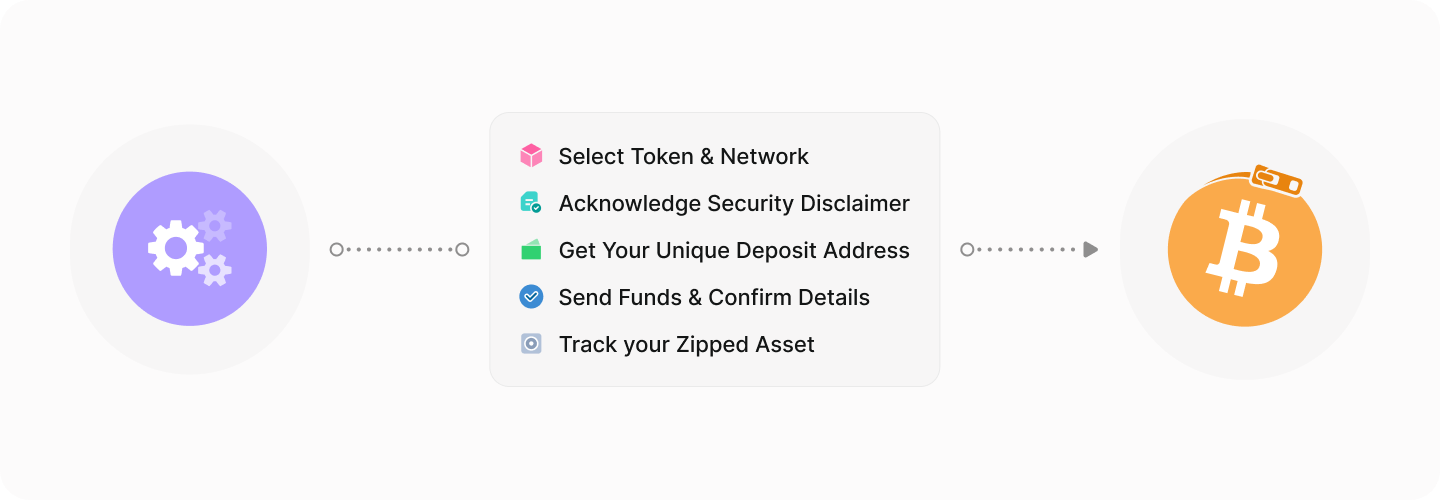
1. Navigate to the **Zipper App** and select the **"Deposit"** tab.
2. Click on the **"Select a Z"** dropdown.
3. Use the search bar to **find a token** by name or **paste the contract address** of the external blockchain asset you wish to zip into Fabric.

**Example (USDT on Ethereum):**

✅ **Option A:** Search for **USDT** and select it from the dropdown list.\
✅ **Option B:** Paste the **Ethereum USDT contract address** manually to ensure accuracy.

4. Choose the **network** the external asset is coming from. Since USDT exists on multiple chains, for our example we need to ensure **Ethereum** is selected in the **Network dropdown**.

{% hint style="danger" %}
**Warning:** Selecting the wrong token or network **may result in permanent loss of funds**. **Always double-check your selections before proceeding.**
{% endhint %}

### **Step 2: Acknowledge the Disclaimer & Reveal the Deposit Address**

Before revealing your deposit address, **Zipper will display an acknowledgment disclaimer** explaining important security information.

1. **Read the disclaimer carefully** to ensure you understand the risks and responsibilities.
2. Click **"Acknowledge"** to proceed.

### **Step 3: Copy & Use Your Unique Deposit Address**

Once acknowledged, your **unique deposit address** will be displayed.

✅ **Funds sent to this deposit address will be zipped and credited to your Fabric wallet.**\
✅ **This address is unique to you** and can be used multiple times.

🚀 **Key Notes About Your Deposit Address:**

* **Zipper does not track deposit origins -** you can deposit from a **CEX, multiple wallets, or other sources**.
* **Use the Copy Button** to avoid typing errors. **Always double-check the pasted address** before sending funds.
* **There is no expiration -** you can send funds at any time. **Do not rush; verify all information to avoid mistakes.**

### **Step 4: Confirm Deposit Details & Send Your Funds**

Below the deposit address, **Zipper displays key transaction details for verification:**

✔ **Fabric Wallet Address:** This is where the **zipped assets will be sent -** ensure it matches your connected wallet.\
✔ **Origin Chain Contract Address:** The contract address of the token on its original blockchain (e.g., **Ethereum USDT contract for our example**).\
✔ **Fabric Contract Address:** The **contract address of the zipped version of the token** (e.g., **zUSDT on Fabric for our example**).

🚀 **Estimated Confirmation Time:** Zipper provides an **estimated processing time** so you know when your zipped assets will arrive.

### **Step 5: Monitor Your Deposit & Transaction History**

1. **Send the selected asset to your deposit address** using your external wallet or exchange.
2. The zipping process will initiate and process automatically.
3. You can track your deposit under the **"Recent Deposits"** section of the deposit screen.
4. Once completed, the **Overview** and **Activity** pages will update to reflect the transaction.

***

🎉 **Congratulations! You have successfully zipped assets and are ready to use the Fabric blockchain!**


# Unzipping: Step-by-Step

<figure><img src="/files/LRA8TYufR2o9uICrpzjd" alt=""><figcaption></figcaption></figure>

{% hint style="warning" %}
**Before You Begin:** This guide assumes you already have **zipped assets** on the **Fabric network**.  **If you need zipped assets, please visit Zipping: Step-by-Step** for instructions.
{% endhint %}

### **Step 1: Access the Withdraw Tab**

1. Navigate to the **Zipper App** and select the **"Withdraw"** tab.
2. Click on the **"Select a Coin"** dropdown.
3. Use the search bar to **find a zAsset** by name or **paste its contract address** on Fabric.

**Example (zUSDT on Fabric):**

✅ **Option A:** Search for **zUSDT** and select it from the dropdown list.\
✅ **Option B:** Paste the **Fabric zUSDT contract address** manually to ensure accuracy.

{% hint style="danger" %}
**Warning:** Selecting the wrong token may result in permanent loss of funds. **Always double-check your selection before proceeding.**
{% endhint %}

### **Step 2: Enter a Destination Address**

Since **every zAsset is mapped to a specific external blockchain**, there is **no network selection step -** Zipper already knows which blockchain the original asset belongs to.

Instead, users must **provide a valid destination address** on the **correct blockchain** where the unzipped funds will be sent.

This can be:

* A **self-custodial wallet** (e.g., MetaMask for Ethereum, Phantom for Solana).
* A **CEX deposit address** (e.g., Binance, Coinbase, Kraken).
* Any other wallet capable of receiving the unzipped asset.

{% hint style="danger" %}
**Important:**

* The **destination address must match the correct blockchain** of the original asset.
* **Incorrect address entries will result in loss of funds.**
* A disclaimer will appear in this section to remind users of this risk.
  {% endhint %}

### **Step 3: Select the Amount to Unzip**

1. Select the amount of **zAsset** you with to **withdraw (unzip)**. There are 3 easy methods to choose an amount.
   1. Enter the amount in the **input field**.
   2. Use the **MAX button** to select your full balance.
   3. Use the **slider** to withdraw a percentage of your zAsset.

{% hint style="info" %}
**Reminder:** Unzipping burns your zAssets on Fabric, releasing the original asset to the provided destination address.
{% endhint %}

### **Step 4: Review & Confirm Withdrawal Details**

Before proceeding, carefully review the withdrawal summary:

✔ **Destination Address** - The wallet where the original asset will be sent.\
✔ **From Wallet** - Your connected **Fabric wallet**, where zAssets will be burned from.\
✔ **Estimated Confirmation Time** - Approximate time for the unzipping process to complete.\
✔ **Estimated Network Fee** - The transaction cost required to complete the process.

**Double-check all details before proceeding to avoid irreversible mistakes.**

### **Step 5: Confirm the Unzip Request**

1. Click **"Withdraw"** to begin the process.
2. MetaMask (or your connected wallet) will prompt you to **confirm the blockchain transaction**.
3. Approve the transaction to finalize the unzipping request.

**Once confirmed, Zipper will begin processing the unzipping.**

### **Step 6: Monitor Your Withdrawal & Transaction History**

1. The **Recent Withdrawals** section will update with your request.
2. Your **Overview** and **Activity** pages will reflect the transaction as it is processed and completed.

***

🎉 **Congratulations! Your funds have been unzipped and are now available on the original blockchain!**


# Zip/Unzip Fees

<figure><img src="/files/RjX0JGGs3fz0TKEyjcUp" alt=""><figcaption></figcaption></figure>

Zipping and unzipping assets on Zipper incurs **no additional service fees** beyond the **network transaction costs** required to process deposits and withdrawals.

📌 **Zipper does not charge percentage-based fees -** users only pay the necessary blockchain gas fees to facilitate the transfer of assets.

### **How Are Fees Calculated?**

* **Deposit (Zip):** Users pay the network fee required to send their assets to the Zipper vault on the original blockchain. Fabric Labs sponsors the network costs on Fabric for minting the zAsset and transferring to your user wallet.
* **Withdrawal (Unzip):** Users pay the network fee required to process the withdrawal and transfer the original asset to their destination address from the Zipper vault. Fabric Labs sponsors the network costs on Fabric for burning the zAsset.
* **Fees are dynamically calculated** based on **real-time network conditions** and are displayed before confirming a transaction.

***

### **Current Estimated Fees**

<table><thead><tr><th>Transaction Type</th><th width="405.65234375">Fee Calculation</th></tr></thead><tbody><tr><td><strong>Deposit (Zip)</strong></td><td>Gas fee of the external blockchain (e.g., ETH gas for Ethereum, SOL fee for Solana). Fabric costs for minting zAssets are currently sponsored by Fabric Labs.</td></tr><tr><td><strong>Withdrawal (Unzip)</strong></td><td>Gas fee of the destination blockchain (e.g., ETH gas for Ethereum withdrawals, SOL fee for Solana withdrawals). Fabric costs for burning zAssets are currently sponsored by Fabric Labs.</td></tr></tbody></table>

{% hint style="info" %}
**Note:** Fees fluctuate based on network congestion. The final fee will be displayed before confirming a transaction.
{% endhint %}


# Navigating Zipper.Trade

The Zipper website offers a streamlined and user-friendly platform for wrapping (zipping) and unwrapping (unzipping) assets. Follow these steps to securely interact with Zipper and manage your assets

talk about what these charts mean, total TVL locked explained, how to find tokens, how to find chains, how to verify contracts, how to get to your user page, what does user page info mean

#### **Step 1: Connect Your Wallet**

1. Open the Zipper website and click **"Connect Wallet"**.
2. Select a Fabric-compatible wallet (e.g., MetaMask, WalletConnect).
3. Authorize the connection in your wallet.
4. Ensure you have sufficient native currency in your wallet (e.g., ETH, SOL) to cover transaction fees.

***

#### **Step 2: Wrapping (Zipping) Assets**

1. Navigate to the **"Wrap Assets"** section on the website.
2. Select the blockchain and asset you wish to wrap (e.g., Ethereum → USDT).
3. Enter the amount of the asset you want to wrap.
4. Review the transaction details:
   * The zAsset you will receive (e.g., zUSDT).
   * Associated fees and the 1:1 collateralization guarantee.
5. Approve the transaction in your wallet.
6. Once the transaction is confirmed, the equivalent zAssets will be sent to your Fabric-compatible wallet.

***

#### **Step 3: Unwrapping (Unzipping) Assets**

1. Go to the **"Unwrap Assets"** section on the website.
2. Select the zAsset you want to unwrap (e.g., zETH).
3. Enter the amount to unwrap.
4. Review the transaction details:
   * The original asset you will receive.
   * Fees for the unwrapping process.
5. Confirm the transaction in your wallet.
6. Once processed, the original asset will be sent back to your external wallet.

***

#### **Best Practices for Using Zipper**

* **Verify Contract Addresses**: Always double-check the contract address of the zAsset and its original counterpart on the Zipper website or FabricScan.
* **Monitor Transaction Status**: Track the progress of your wrapping or unwrapping transaction using FabricScan or the original chain’s explorer.
* **Check Wallet Balances**: Ensure your wallet has sufficient funds to cover gas fees before initiating any transaction.


# Using Zipper via Polyester

Zipper functionality is fully integrated into Polyester, Fabric’s decentralized exchange (DEX), allowing users to wrap (zip) and deposit assets directly into their Polyester account.

#### **How It Works**

**Step 1: Access Polyester**

1. Open the Polyester Exchange.
2. Connect your Fabric-compatible wallet (e.g., MetaMask, WalletConnect).

**Step 2: Select Deposit Option**

1. Navigate to the **Deposit** section on Polyester.
2. Choose the asset you want to deposit (e.g., USDT) and select its originating chain (e.g., Ethereum).

**Step 3: Wrapping and Depositing**

1. **Combined Flow**:
   * Polyester will initiate the wrapping (zipping) process for you.
   * The original asset is deposited into Zipper’s vault.
   * The equivalent zAsset (e.g., zUSDT) is minted and automatically deposited into your Polyester account.
2. **Verification**:
   * Polyester will only accept deposits of verified zAssets. If the asset is not supported, the deposit will be rejected.

**Step 4: Start Trading**

* Once deposited, the zAsset is available in your Polyester account and ready for trading, staking, or other activities within Polyester’s advanced order book system.

***

#### **Key Features of Using Zipper on Polyester**

1. **Streamlined Workflow**:
   * Users can wrap and deposit assets in a single step without needing to visit the standalone Zipper website.
2. **Verified Tokens Only**:
   * Polyester ensures only validated tokens are accepted for deposit, enhancing security and user trust.
3. **Advanced Trading Capabilities**:
   * Wrapped assets deposited via Polyester can be immediately utilized in limit orders, TWAPs, and other advanced trading features.


# Combined Flow (Wrapping and Depositing Directly)


# Verified Tokens and Limits


# Zipper Architecture

<figure><img src="/files/dJRy5VwCcLCL8ZGwJOAz" alt=""><figcaption></figcaption></figure>

### **1. Overview of Zipper’s Design**

Zipper is designed as a **minimalistic, high-security asset zipping (wrapping) and unzipping (unwrapping) protocol** within the Fabric ecosystem. Unlike traditional cross-chain bridges, Zipper does not facilitate swaps or liquidity pooling - its sole function is to **issue 1:1 backed zAssets by securely storing the original assets in vaults on their native blockchains**.

Zipper’s architecture ensures:

* **Immutable zAsset minting/burning**: zAssets are only created when external assets are deposited and are destroyed upon withdrawal.
* **No liquidity risk**: Every zAsset is fully backed 1:1, eliminating risks of over-minting or under-collateralization.
* **Maximum transparency**: Every transaction is recorded on-chain and can be verified by users.
* **Zero reliance on third-party custodians**: Assets are secured via **multi-signature vaults protected by a Trusted Execution Environment (TEE)**.

***

### **2. Core Components of Zipper**

#### **a. Smart Contracts**

* **Vault Contracts:** Maintain **on-chain tracking** of assets held in external vaults.
* **Mint/Burn Contracts:** Handle **zAsset issuance and destruction** when deposits/withdrawals are processed.
* **User Authentication Contracts:** Verify and **authorize users interacting with Zipper**, ensuring they have the correct permissions.

#### **b. On-Chain Vaults**

* Zipper vaults **are multi-signature wallets** governed by a **TEE-protected security model**.
* Every vault is **isolated per asset and chain**, meaning ETH-based USDT is stored in a separate vault from Solana-based USDT.
* Vault operations **require multi-party approval**, ensuring no single entity controls funds.
* Funds **can only be withdrawn via an authorized unzipping event**, preventing unauthorized access.

#### **c. Fabric-Based zAssets**

* Each zAsset is issued with a **unique Fabric contract address** to differentiate between identical tickers from different chains.
* Users can **verify the origin of their zAssets** via FabricScan.
* Zipper itself **does not verify asset legitimacy -** it simply mints and burns assets based on deposit/withdrawal activity. **Verification occurs at the application layer (e.g., Polyester DEX).**

#### **d. Fabric Blockchain Interaction**

* All Zipper transactions occur **on-chain**, meaning no off-chain validators or secondary approval processes exist.
* **Fabric consensus finalizes all minting/unzipping events**, ensuring transactions are immutable once confirmed.
* **TEE and multi-sig models prevent unauthorized vault access** even in worst-case scenarios.

***

### **3. Security Model**

#### **a. Multi-Signature Vault Protection**

* Vault transactions require **signatures from multiple independent parties**.
* Private keys are distributed across a **TEE-secured environment**, ensuring no single entity has full access.

#### **b. Trustless Verification**

* **Users can track all deposits and withdrawals on-chain** using FabricScan.
* The protocol is **non-custodial -** users do not need to trust intermediaries to access their funds.

#### **c. No Upgradeability for Compliance**

* **Zipper contracts are immutable once deployed**, meaning no entity (including developers) can alter contract behavior post-launch.
* This protects users from **governance takeovers, malicious updates, and regulatory pressure**.

***

### **4. Transaction Flow: Zipping & Unzipping**

**Zipping Process:**

1. User initiates a deposit on **Zipper.trade**.
2. Zipper generates a **unique deposit address** based on the selected token and network.
3. User sends the external asset to this address.
4. Once received and confirmed on the originating chain, the equivalent zAsset is minted on Fabric.
5. The zAsset appears in the user’s connected Fabric wallet.

**Unzipping Process:**

1. User initiates an **unzip request** on **Zipper.trade**.
2. They select the zAsset and enter a **destination address** on the correct external chain.
3. Zipper confirms the burn request, destroying the zAsset on Fabric.
4. The original asset is released from the **corresponding on-chain vault** and sent to the user’s external wallet.

***

### **5. Why This Model?**

Zipper’s **security-first design** avoids common pitfalls seen in bridges and cross-chain protocols:\
✅ **No liquidity pools** → No risk of **impermanent loss, rug pulls, or liquidity drain exploits**.\
✅ **Immutable contracts** → Reduces attack vectors from contract upgrades.\
✅ **TEE and multi-sig protection** → No single point of failure in vault operations.\
✅ **1:1 backing model** → Fully collateralized zAssets, with **zero over-minting risk**.

***

### **Conclusion**

Zipper’s architecture prioritizes **security, transparency, and simplicity**, offering users a **safe and efficient** way to bring external assets into the Fabric ecosystem. By eliminating trust dependencies, relying on on-chain verification, and securing funds through **TEE and multi-signature vaults**, Zipper provides a **robust foundation for cross-chain asset interoperability** within Fabric.


# APIs and Best Practices


# Zipper Architecture

This section provides an overview of the technical architecture and processes behind Zipper’s functionality.

#### **Core Architecture**

1. **Vault System**:
   * Original assets are stored in **multi-signature wallets** managed with a **Trusted Execution Environment (TEE) protocol** to maximize security.
   * Vaults are fully decentralized, ensuring no single entity has control over the private keys.
2. **1:1 Minting and Burning**:
   * Every zAsset minted on Fabric corresponds to an equal amount of the original asset held in Zipper’s vault.
   * When a zAsset is unwrapped, it is burned on Fabric, and the original asset is released from the vault.
3. **On-Chain Transparency**:
   * All transactions are fully recorded on-chain, allowing users to verify the status of their assets at any time.

***

#### **Technical Workflow**

**Wrapping (Zipping)**

1. The user deposits an asset (e.g., USDT from Ethereum) into Zipper’s vault.
2. Zipper mints an equivalent amount of zAssets (e.g., zUSDT) on Fabric.
3. The zAssets are sent to the user’s Fabric-compatible wallet.

**Unwrapping (Unzipping)**

1. The user sends their zAssets (e.g., zUSDT) to Zipper.
2. Zipper burns the zAssets on Fabric.
3. The original asset is released from the vault and sent back to the user’s external wallet.

***

#### **Key Design Features**

1. **Decentralized Security**:
   * The TEE protocol and multi-signature wallets prevent unauthorized access and ensure the safety of user funds.
2. **Cross-Chain Compatibility**:
   * Zipper supports assets from multiple blockchains, with unique contracts for each chain.
3. **Compliance Measures**:
   * Transactions are screened for compliance, blocking interactions with flagged or sanctioned wallets.


# Architecture Overview

#### **1. Architecture Overview** (Sub-Page)

* **Unique Content Ideas**:
  * Explain Zipper's technical stack (e.g., use of Fabric, smart contracts, multi-sig wallets).
  * Highlight the roles of key components, like the TEE protocol, vault structure, and on-chain interactions.
  * Dive deeper into the decentralization measures, such as how multi-sig approvals work.
  * Include a diagram detailing the architecture flow (user interaction → Zipper → vault → Fabric blockchain).


# Minting and Burning Logic

#### **2. Minting and Burning Logic** (Sub-Page)

* **Unique Content Ideas**:
  * Provide a technical explanation of the 1:1 minting and burning mechanism.
  * Describe how contract logic ensures no over-minting or under-burning of zAssets.
  * Explain edge case handling (e.g., what happens if a transaction is interrupted).
  * Include pseudo-code or flow diagrams for the minting and burning processes.


# Transaction Finality

#### **How Transaction Finality Works**

1. **Consensus on Fabric**:
   * Fabric uses a deterministic consensus mechanism to confirm transactions. This guarantees that once a transaction is validated and added to the blockchain, it cannot be reversed or tampered with.
2. **Confirmation Thresholds**:
   * For wrapping:
     * The original asset must be fully deposited in Zipper’s vault before the equivalent zAssets are minted.
   * For unwrapping:
     * The zAsset must be fully burned before the original asset is released from the vault.
3. **On-Chain Transparency**:
   * All transactions are recorded on Fabric’s blockchain, allowing users to verify the status and finality of their operations in real-time using FabricScan.

***

Here’s the draft for the **Transaction Finality** page:

***

### **Transaction Finality**

Transaction finality ensures that every wrapping (zipping) and unwrapping (unzipping) operation processed by Zipper is secure, irreversible, and fully backed by the original assets. This section explains how Zipper leverages Fabric’s consensus mechanism to maintain trust and reliability.

***

#### **How Transaction Finality Works**

1. **Consensus on Fabric**:
   * Fabric uses a deterministic consensus mechanism to confirm transactions. This guarantees that once a transaction is validated and added to the blockchain, it cannot be reversed or tampered with.
2. **Confirmation Thresholds**:
   * For wrapping:
     * The original asset must be fully deposited in Zipper’s vault before the equivalent zAssets are minted.
   * For unwrapping:
     * The zAsset must be fully burned before the original asset is released from the vault.
3. **On-Chain Transparency**:
   * All transactions are recorded on Fabric’s blockchain, allowing users to verify the status and finality of their operations in real-time using FabricScan.

***

#### **What Happens During Network Congestion?**

1. **Wrapping Transactions**:
   * If the source chain experiences congestion, Zipper waits until the deposit is confirmed before minting the zAsset on Fabric. This ensures no double-spending or over-minting occurs.
2. **Unwrapping Transactions**:
   * Similarly, Zipper will only release the original asset after confirming the burn of the corresponding zAsset on Fabric.
3. **User Notifications**:
   * The Zipper interface provides estimated transaction times during periods of network congestion, ensuring users remain informed.

***

#### **Fail-Safe Mechanisms**

* **Reconciliation Processes**:
  * Zipper continuously monitors transactions to identify and resolve discrepancies between vault balances and zAsset supplies.
* **Fallback Systems**:
  * In case of unexpected failures (e.g., network outages), Zipper’s operations pause temporarily to prevent asset mismatches.


# Role of Fabric Consensus Mechanism


# Handling Network Delays or Failures


# Interoperability

#### **How Zipper Enables Interoperability**

1. **Cross-Chain Compatibility**:
   * Zipper supports assets from multiple blockchains, such as Ethereum, Solana, Binance Smart Chain, Avalanche, Dogecoin, and Litecoin.
   * Each asset is mapped to a unique contract address on Fabric, ensuring distinct identification.
2. **Chain-Specific Contracts**:
   * For every supported blockchain, Zipper establishes a dedicated contract on Fabric to handle wrapping and unwrapping transactions.
   * Example:
     * Ethereum-originating USDT → Fabric Contract A → zUSDT.
     * Solana-originating USDT → Fabric Contract B → zUSDT.
3. **Unified zAssets**:
   * Regardless of their originating chain, wrapped assets are presented as a unified zAsset (e.g., zUSDT) within the Fabric ecosystem.
   * On-chain metadata ensures that the source chain remains identifiable for security and compatibility.

***

#### **Compliance for Cross-Chain Transactions**

1. **Chain Monitoring**:
   * Zipper integrates with monitoring services to detect and block transactions involving:
     * Sanctioned wallets.
     * Assets flagged for theft or illicit activity.
2. **Transparency for Users**:
   * Users can verify both the Fabric and original chain contract addresses of their zAssets via FabricScan or the Zipper website.

***

Here’s the draft for the **Interoperability** page:

***

### **Interoperability**

Zipper is built to bridge assets across multiple blockchains, making it a vital component of the Fabric ecosystem’s cross-chain functionality. This section explains how Zipper ensures smooth asset integration while maintaining security and transparency.

***

#### **How Zipper Enables Interoperability**

1. **Cross-Chain Compatibility**:
   * Zipper supports assets from multiple blockchains, such as Ethereum, Solana, Binance Smart Chain, Avalanche, Dogecoin, and Litecoin.
   * Each asset is mapped to a unique contract address on Fabric, ensuring distinct identification.
2. **Chain-Specific Contracts**:
   * For every supported blockchain, Zipper establishes a dedicated contract on Fabric to handle wrapping and unwrapping transactions.
   * Example:
     * Ethereum-originating USDT → Fabric Contract A → zUSDT.
     * Solana-originating USDT → Fabric Contract B → zUSDT.
3. **Unified zAssets**:
   * Regardless of their originating chain, wrapped assets are presented as a unified zAsset (e.g., zUSDT) within the Fabric ecosystem.
   * On-chain metadata ensures that the source chain remains identifiable for security and compatibility.

***

#### **Compliance for Cross-Chain Transactions**

1. **Chain Monitoring**:
   * Zipper integrates with monitoring services to detect and block transactions involving:
     * Sanctioned wallets.
     * Assets flagged for theft or illicit activity.
2. **Transparency for Users**:
   * Users can verify both the Fabric and original chain contract addresses of their zAssets via FabricScan or the Zipper website.

***

#### **Interoperability Challenges and Solutions**

1. **Challenge**: Varying standards across blockchains (e.g., ERC-20, SPL, BEP-20).
   * **Solution**: Zipper normalizes these standards into Fabric-compatible zAssets, ensuring compatibility with Fabric-based dApps and DeFi protocols.
2. **Challenge**: Network Congestion or Delays.
   * **Solution**: Zipper incorporates user notifications and fallback systems to handle cross-chain delays effectively.
3. **Challenge**: Ensuring zAsset Verification.
   * **Solution**: Zipper uses metadata and unique contract addresses to verify zAssets’ origins and legitimacy.


# Chain Monitoring for Compliance


# Differentiation of Wrapped Assets Across Chains


# Compliance Mechanisms

<figure><img src="/files/YJx5qVNTa9dmavnUAbQw" alt=""><figcaption></figcaption></figure>

### **Compliance Mechanisms**

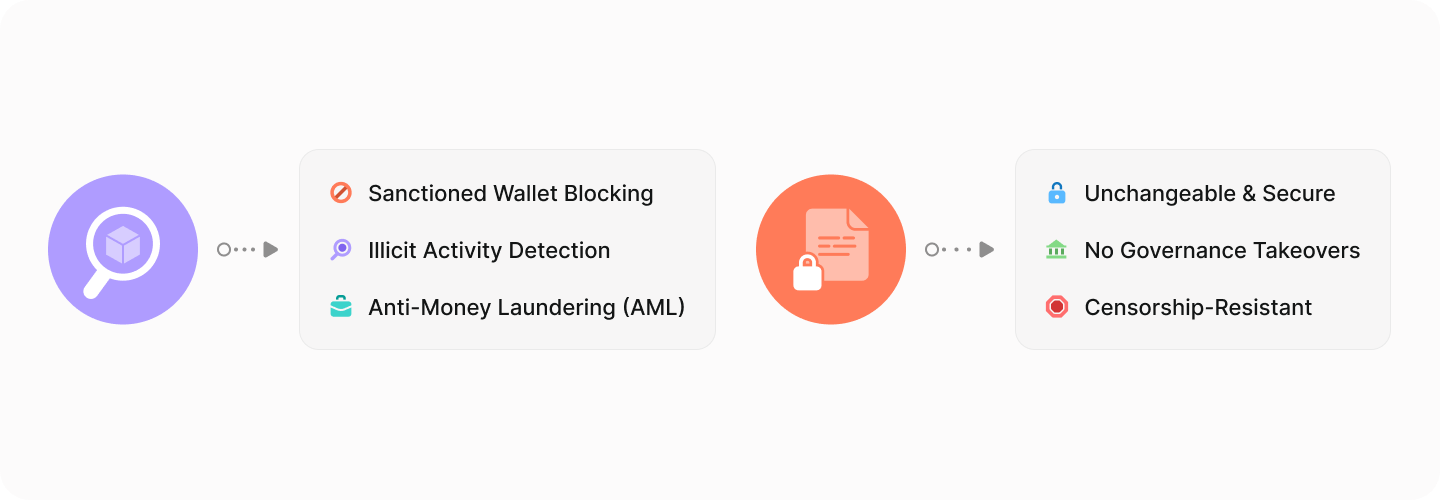
Zipper integrates **two key compliance mechanisms** to ensure a secure, transparent, and trustless asset zipping (wrapping) and unzipping (unwrapping) process:

1. **On-Chain Transaction Monitoring** - Detecting and preventing interactions with illicit or sanctioned funds.
2. **Immutable Smart Contracts** - Ensuring Zipper remains secure, non-custodial, and resistant to external interference.

These mechanisms **work together** to **mitigate risk, maintain regulatory integrity, and build trust** among users and developers alike.

***

### **1. On-Chain Transaction Monitoring**

Zipper employs a **third-party chain monitoring service** to scan all transactions for compliance violations, including:

✅ **Sanctioned Wallets** - Blocking addresses flagged under **OFAC (Office of Foreign Assets Control)** or similar regulatory frameworks.\
✅ **Illicit Activity** - Identifying wallets linked to **hacked, stolen, or blacklisted funds**.\
✅ **Anti-Money Laundering (AML) Measures** - Monitoring suspicious transaction patterns and blocking high-risk transfers.

#### **How It Works**

* Chain monitoring services **run real-time checks** on deposit and withdrawal transactions.
* If a transaction **involves a flagged address**, the transfer is automatically **rejected and flagged for further review or returned the originator**.
* This system **protects Zipper from becoming a vehicle for illicit financial activity** while allowing legitimate users to transact.

#### **Why This Matters**

🔹 **Ensures Zipper remains compliant** with global financial regulations.\
🔹 **Prevents stolen assets from being laundered** through the protocol.\
🔹 **Increases user confidence** by maintaining a secure and trusted environment.

{% hint style="info" %}
**Important:** Zipper **does not collect user data** or interfere with transactions beyond these compliance checks. The system operates at the **protocol level**, ensuring neutrality while enforcing security measures.
{% endhint %}

### **2. Immutable Smart Contracts**

Zipper's **smart contracts are immutable**, meaning they **cannot be modified, upgraded, or altered** after deployment. This immutability is a **key compliance mechanism** because it ensures that:

✅ **The contract logic remains trustless** - No entity (including developers) can change how Zipper operates post-deployment.\
✅ **Users are fully protected from governance takeovers** - No centralized group can introduce new permissions, backdoors, or exploits.\
✅ **Regulatory transparency is enforced** - The protocol operates under **fixed, predictable conditions**, eliminating concerns about external manipulation.

#### **How It Works**

* Once Zipper contracts are **deployed and verified**, they **cannot be altered or upgraded**.
* Any changes to how Zipper functions **would require deploying an entirely new version**, ensuring that existing contracts remain untouched.
* This model **protects users from unexpected risks**, ensuring **the same rules apply to all participants at all times**.

#### **Why This Matters**

🔹 **Prevents centralized control over user funds.**\
🔹 **Eliminates the risk of malicious contract updates.**\
🔹 **Ensures Zipper remains decentralized, predictable, and censorship-resistant.**


# Compliance Mechanisms

#### TRM for Wallet/OFAC Screening

####

#### **Key Compliance Measures**

1. **Chain Monitoring Services**:
   * Zipper partners with chain monitoring companies to identify and block:
     * Transactions involving sanctioned wallets (e.g., OFAC-listed addresses).
     * Wallets flagged for theft, fraud, or other illicit activities.
   * These services provide real-time alerts and verification during the wrapping and unwrapping processes.
2. **Screening for Flagged Transactions**:
   * Every transaction is checked for compliance during the wrapping (zipping) and unwrapping (unzipping) workflows.
   * Transactions that fail compliance checks are flagged and prevented from completing.
3. **Transparency and User Notifications**:
   * If a transaction is flagged, users receive clear notifications explaining the issue and next steps.
   * The system prioritizes transparency to maintain user trust in the compliance process.
4. **No Extra Burden on Users**:
   * Zipper’s compliance mechanisms operate in the background, ensuring a seamless user experience without requiring additional input or steps.

***

#### **Why Compliance Matters**

* **For Users**:
  * Protects funds from interacting with flagged or malicious wallets.
  * Builds trust in the ecosystem by ensuring legitimate transactions.
* **For the Ecosystem**:
  * Prevents illicit activity, reinforcing the security and reputation of Fabric-based dApps and DeFi protocols.


# Sanctioned Wallets and OFAC Restrictions


# Role of Chain Monitoring Companies


# Audits and Transparency

#### **Transparency Features**

1. **On-Chain Visibility**:
   * Every transaction, including wrapping (zipping) and unwrapping (unzipping), is recorded on Fabric’s blockchain.
   * Users can verify their transactions and the status of their zAssets using FabricScan.
2. **Traceable Asset Contracts**:
   * Each zAsset is tied to a unique contract address on Fabric, linked directly to its originating blockchain.
   * Users can confirm the backing of their zAssets by comparing Fabric and source chain contract addresses.
3. **Real-Time Vault Balances**:
   * Zipper’s vaults are fully auditable, allowing users and third-party services to verify that all zAssets are 1:1 backed by their original assets.

***

#### **Audit Processes**

1. **Smart Contract Audits**:
   * Zipper’s smart contracts undergo rigorous external audits to ensure they are free from vulnerabilities.
   * Key areas of focus include:
     * Minting and burning logic.
     * Vault security.
     * Transaction flow and compliance integration.
2. **Independent Oversight**:
   * External audit reports are published and made accessible to the public for full transparency.
   * Regular reviews are conducted to identify and mitigate potential risks.
3. **Community Audits**:
   * The open nature of Zipper’s on-chain activities allows independent developers and users to monitor and verify the system’s integrity.

***

#### **Why Audits and Transparency Matter**

* **Builds User Confidence**:
  * Transparent operations and public audits reassure users that their assets are secure and properly managed.
* **Protects the Ecosystem**:
  * Independent audits reduce the risk of vulnerabilities, safeguarding the integrity of the Fabric ecosystem.


# Plans for External Audits


# Protecting User Funds


# Redundancy and Fail-Safe Measures


# Emergency Responses to Network Issues


# Vault Architecture

<figure><img src="/files/CvwvQ3bZ8V9PFMrGRBBC" alt=""><figcaption></figcaption></figure>

Zipper’s **vault system is designed for efficiency and cost-effectiveness**, ensuring every zAsset remains fully **1:1 backed** while minimizing gas costs across different blockchain networks. Unlike a traditional pooled vault model, Zipper **utilizes a distributed deposit system**, where user deposits are managed across multiple addresses before being consolidated into a **main vault**.

***

### **Deposit Addresses vs. Main Vaults**

Zipper operates with **two distinct types of vault addresses** to manage assets efficiently:

1. **Deposit Addresses** - User-specific addresses used for receiving deposits before consolidation.
2. **Main Vaults** - Primary storage locations where assets are consolidated after deposits.

***

### **How Funds Move in Zipper**

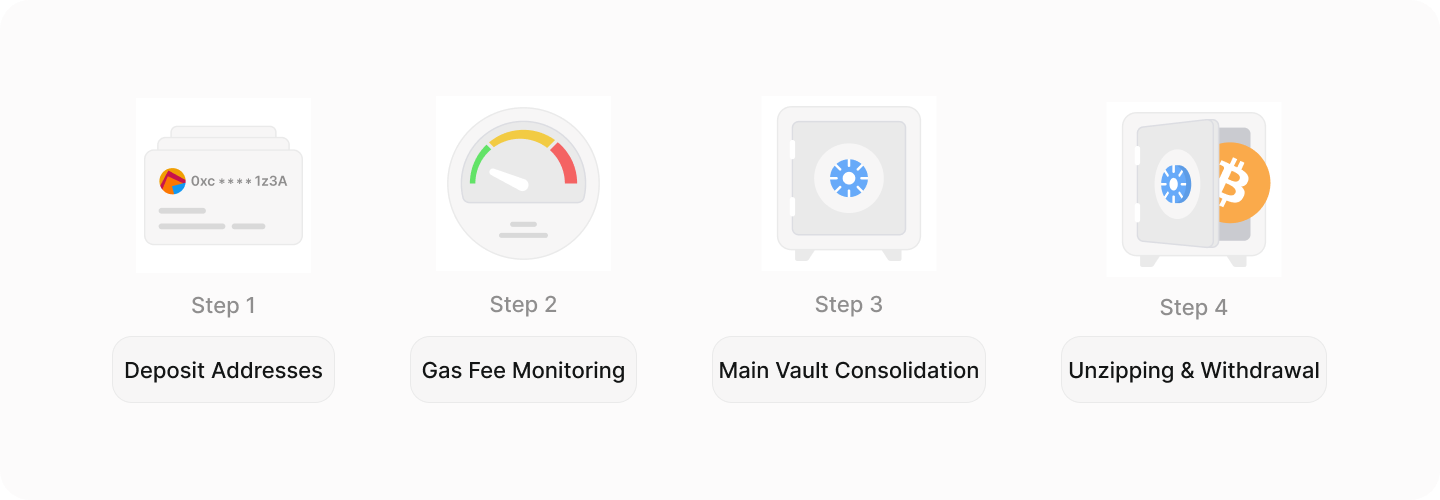
#### **Step 1: Deposits are Sent to Users' Deposit Addresses**

* When a user **zips an asset**, they send it to their **designated deposit address**, which is unique to them.
* These deposit addresses **are not uniquely generated for every deposit**, meaning users deposit to the same assigned address each time if depositing the same asset or on the same network as a previous deposit.
* **Deposit addresses are not shared between users**, ensuring funds remain separate and **avoiding commingling.**
* Although deposit addresses are distinct from the main vault, they are still **secured under the same private key model** as the main vault.

#### **Step 2: Backend Workers Monitor for Optimal Gas Fees**

* Instead of immediately consolidating all deposits into the main vault, **Zipper’s backend infrastructure monitors gas prices on the originating chain.**
* When network conditions are favorable, deposits are **batched and consolidated** into the **main vault** to minimize unnecessary gas costs.

#### **Step 3: Main Vaults Store the Bulk of Zipped Assets**

* Each **supported token** has **one primary vault per blockchain**.
* The **main vault is used for fulfilling unzips**, ensuring **sufficient liquidity is available when users withdraw assets**.
* Even if a token exists in multiple deposit addresses, the total amount across **deposit addresses + main vault = 1:1 backing for all zAssets** on Fabric.

#### **Step 4: Unzipping Assets & Covering Withdrawals**

* When a user **unzips** an asset, Zipper first attempts to **release funds from the main vault**.
* If the main vault does not have enough funds to immediately process the request (before gas-efficient consolidation has occurred), Zipper **automatically fetches the required funds from existing deposit addresses** to fulfill the withdrawal.
* This mechanism ensures **all withdrawals are processed seamlessly, regardless of vault balance distribution at any given time.**

***

### **Key Vault Architecture Takeaways**

✅ **1:1 Backing Across All Addresses** - Assets in deposit addresses and main vaults **collectively ensure every zAsset remains fully backed.**\
✅ **One Main Vault Per Token, Multiple Deposit Addresses** - Each **token has its own dedicated vault**, but deposit addresses can handle multiple tokens from the same blockchain.\
✅ **No Commingling of User Funds** - Deposit addresses are **assigned per user**, ensuring **clear separation of assets** before consolidation.\
✅ **Dynamic Fund Consolidation** - Zipper’s architecture is designed to **minimize gas fees** by batching deposit transfers during **low-fee windows**.\
✅ **Efficient Withdrawal Processing** - If the main vault is temporarily underfunded due to unprocessed consolidations, Zipper **automatically retrieves assets from deposit addresses** to fulfill withdrawals without delay.


# What Is TEE?

<figure><img src="/files/uRniPcHlKVI7BDgsy02Q" alt=""><figcaption></figcaption></figure>

## **Introduction to Trusted Execution Environments (TEE)**

A **Trusted Execution Environment (TEE)** is a **secure enclave within a processor** that allows sensitive operations - such as **private key storage and transaction signing -** to be executed **in complete isolation** from the rest of the system.

This means that even if the **host machine running the TEE is compromised**, the **private keys remain protected**, and no unauthorized entity can access or manipulate transactions.

***

## **Why is TEE the Gold Standard for Private Key Security?**

### **1. Private Keys Are Never Exposed**

TEE ensures that **private keys are never accessible outside the enclave -** not even to the operating system, the machine owner, or any external attackers.

**Key Takeaway:** Even in a full system compromise, the **private keys remain completely secure inside the TEE.**

### **2. Hardware-Enforced Isolation**

Unlike software-based security models, which rely on **application-level encryption**, TEE provides **hardware-backed isolation**, meaning:

✅ The **OS and other applications cannot read private keys** stored in TEE.\
✅ **Malware, remote exploits, and insider attacks** cannot extract sensitive cryptographic material.\
✅ Even the **infrastructure provider cannot override TEE protections**.

**Key Takeaway:** If the **host system is hacked**, the attacker still **cannot extract the private keys** inside the TEE.

### **3. Secure Transaction Authorization Without Leaking Keys**

TEE not only **stores private keys** but also **executes cryptographic signing operations** within its **isolated enclave**. This means:

✅ **Transactions are signed inside TEE** without the private key ever leaving the secure environment.\
✅ **Even the host machine running the TEE cannot retrieve private keys**—it only receives the signed transaction output.\
✅ **Zipper’s vault movements -** whether from **deposit addresses to main vaults, or vaults to user withdrawals -** are authorized in a completely **secure and verifiable manner**.

**Key Takeaway:** Even if external nodes are compromised, **TEE ensures that funds cannot be accessed without proper authorization**.

***

### **How TEE Secures Zipper’s Vaults and Deposits**

Zipper’s architecture **relies on TEE for securing both deposit addresses and main vaults.**

#### **1. Deposit Addresses Are Secured by TEE**

* Each **user’s deposit address is controlled by private keys stored inside TEE**, ensuring that **only authorized transactions can move funds**.
* Even though deposit addresses are assigned to individual users, **TEE ensures that no unauthorized transactions can be made**.

#### **2. Main Vaults Are Governed by TEE-Secured Transactions**

* When assets move from **deposit addresses to the main vault**, the **TEE signs and validates each movement**, ensuring **full security and transparency**.
* During an **unzip operation**, the TEE securely authorizes **funds to be released** from the vault and sent back to the user.

**Key Takeaway:** **TEE prevents unauthorized access to all Zipper-controlled assets -** whether in deposit addresses or main vaults.

### **Why TEE is the Best Choice for Blockchain Security**

| **Security Model**                 | **Key Exposure Risk?**                             | **Hardware-Enforced Protection?** | **Ideal for Blockchain Vault Security?**         |
| ---------------------------------- | -------------------------------------------------- | --------------------------------- | ------------------------------------------------ |
| 🔓 Software Wallets                | **High** (keys stored in memory)                   | ❌ No                              | ❌ Not secure                                     |
| 🔑 Multi-Sig Wallets               | **Moderate** (keys stored across multiple parties) | ❌ No                              | ⚠️ Secure but requires trust in multiple parties |
| 🔒 HSM (Hardware Security Modules) | **Low** (key stored in secure chip)                | ✅ Yes                             | ✅ Secure but requires external trust             |
| 🔐 **TEE-Based Key Storage**       | **Zero** (keys never leave enclave)                | ✅ **Yes**                         | ✅ **Best for blockchain security**               |

**Final Verdict:** **TEE eliminates all major attack vectors** while ensuring cryptographic operations remain **trustless, censorship-resistant, and completely verifiable.**


# Immutable Contracts


# What is MPC?


# Common Questions

#### **General Questions**

1. **What is Zipper?**
   * Zipper is a protocol that enables the secure wrapping and unwrapping of assets from various blockchains into Fabric-compatible zAssets.
2. **What are zAssets?**
   * zAssets are tokenized representations of external blockchain assets, fully backed 1:1 and designed for use within the Fabric ecosystem.
3. **Which blockchains are supported?**
   * At launch, Zipper supports Ethereum, Solana, Binance Smart Chain, Avalanche, Dogecoin, and Litecoin, with plans to expand compatibility over time.

***

#### **Transaction-Related Questions**

1. **How long does a transaction take?**
   * Transaction times depend on the blockchain’s network congestion and the confirmation process. Most transactions complete within a few minutes.
2. **What happens if my transaction fails?**
   * If a transaction fails:
     * Wrapping: The original asset remains in your wallet.
     * Unwrapping: The zAsset remains in your wallet.
     * You can retry the transaction once the issue is resolved.
3. **How can I track my transaction?**
   * Use FabricScan or the block explorer for the originating chain to monitor the status of your transaction.

***

#### **Security and Compliance Questions**

1. **How does Zipper ensure security?**
   * Zipper uses multi-signature wallets and TEE protocols to safeguard user funds and prevent unauthorized access.
2. **What compliance checks does Zipper perform?**
   * Zipper integrates with chain monitoring services to screen for flagged wallets or transactions involving sanctioned addresses.
3. **Can unverified assets be wrapped?**
   * Yes, but users are warned before proceeding. Verified assets are clearly marked on the Zipper website and Polyester exchange.


# Why Was My Transaction Delayed?


# How Do I Verify My zAssets?


# Error Handling

#### **Common Errors and Solutions**

1. **Transaction Delays**
   * **Cause**: Network congestion on the source chain or Fabric.
   * **Solution**:
     * Check the transaction status on FabricScan or the originating chain’s block explorer.
     * If the transaction remains pending for an extended period, ensure you have enough gas fees in your wallet and retry.
2. **Failed Wrapping Transactions**
   * **Cause**: Insufficient funds, contract issues, or compliance flags.
   * **Solution**:
     * Verify that you have sufficient funds to cover gas fees.
     * Double-check the contract address of the asset being wrapped.
     * Resolve any flagged issues if notified by the Zipper UI.
3. **Failed Unwrapping Transactions**
   * **Cause**: Issues with zAssets or wallet misconfiguration.
   * **Solution**:
     * Ensure you are sending the correct zAsset from your Fabric wallet.
     * Confirm the destination wallet address on the original chain.
     * Retry the transaction after correcting any errors.
4. **Incorrect Wallet Address**
   * **Cause**: Inputting the wrong address during wrapping or unwrapping.
   * **Solution**:
     * Zipper transactions are irreversible. Always double-check wallet addresses before confirming.
     * Use copy-paste functions to reduce errors and verify against official sources.
5. **Unsupported Tokens**
   * **Cause**: Attempting to wrap or deposit an unverified or unsupported asset.
   * **Solution**:
     * Check the list of supported tokens on the Zipper website or Polyester exchange.
     * Avoid interacting with assets marked as unverified.

***

#### **What to Do If an Issue Persists**

1. **Contact Support**:
   * Reach out to Zipper support through the official website or designated channels.
   * Provide the transaction ID, affected wallet address, and a detailed description of the issue.
2. **Community Assistance**:
   * Engage with the Zipper community through Fabric’s forums or social channels to troubleshoot common problems.
3. **Monitor Updates**:
   * Check Zipper’s status page or announcements for updates on network issues or protocol changes.


# Recovering From Failed Transactions


# Dealing With Unsupported Tokens


# Key Terms

<figure><img src="/files/3i75TctSvKpzP2MeVqZy" alt=""><figcaption></figcaption></figure>

This section provides definitions for **important terminology** related to **Zipper, the Fabric ecosystem, and general crypto concepts**. Understanding these terms will help users navigate the documentation and interact with Zipper more effectively.

***

### **Zipper-Specific Terms**

#### **Zipper**

A decentralized protocol on **Fabric** that allows users to **zip (wrap) and unzip (unwrap) assets**, bringing external blockchain assets into the Fabric ecosystem.

#### **Zipping (Wrapping)**

The process of **depositing an external blockchain asset into Zipper**, where it is stored securely in a vault, and receiving an equivalent **zAsset** on **Fabric**.

#### **Unzipping (Unwrapping)**

The process of **returning a zAsset to its original blockchain**, where Zipper burns the zAsset on **Fabric** and releases the equivalent asset to the user on the originating chain.

#### **zAssets**

Fabric-compatible, **tokenized representations of external blockchain assets** created when users zip assets into Zipper. **Each zAsset is fully backed 1:1** by its original asset.

#### **Deposit Address**

A **unique blockchain address assigned to a user** where external assets are sent to be zipped. Deposit addresses are controlled by **Zipper’s TEE-secured vaults** and later consolidated into the main vault.

#### **Main Vault**

The **primary storage location for zipped assets** before they are unzipped. Zipper consolidates funds from multiple deposit addresses into the main vault for efficient asset management.

#### **Zip/Unzip Fees**

The **network costs** associated with zipping and unzipping assets. Zipper does not charge additional fees—**only blockchain network fees apply**.

***

### **Fabric Ecosystem Terms**

#### **Fabric**

A high-performance **Layer 1 blockchain** designed for **AI integration, decentralized oracles, and scalable infrastructure**. It serves as the foundation for Zipper and other ecosystem applications.

#### **Polyester**

A **decentralized exchange (DEX)** built on Fabric that allows users to **trade zAssets** with an order book model similar to a centralized exchange (CEX).

#### **FabricScan**

The **block explorer for Fabric**, allowing users to verify **zAsset contract addresses, transactions, and blockchain activity** for full transparency.

***

### **Security & Compliance Terms**

#### **Trusted Execution Environment (TEE)**

A **hardware-based security technology** that **isolates and protects private keys and cryptographic operations** from external access, even if the host system is compromised. Zipper’s vaults use **TEE to prevent unauthorized access**.

#### **Chain Monitoring**

A compliance mechanism that **tracks blockchain transactions for illicit activity**, ensuring **sanctioned wallets, stolen funds, and OFAC-listed addresses** are blocked from using Zipper.

#### **1:1 Backing**

A fundamental security measure ensuring that **every zAsset on Fabric is fully backed** by its original asset in Zipper’s vaults, maintaining **full transparency and redeemability**.

***

### **General Crypto & Blockchain Terms**

#### **Blockchain**

A **decentralized, immutable ledger** that records transactions across multiple nodes, ensuring security, transparency, and resistance to censorship.

#### **Smart Contract**

A **self-executing contract stored on the blockchain** that automatically enforces rules and conditions, eliminating the need for intermediaries.

#### **Layer 1 (L1)**

A **base blockchain network** that processes transactions and provides security. Examples include **Fabric, Ethereum, Solana, and Bitcoin**.

#### **Layer 2 (L2)**

A **secondary network built on top of an L1 blockchain** to improve scalability and reduce fees (e.g., Optimistic Rollups on Ethereum). **Fabric is an L1, not an L2.**

#### **Decentralized Exchange (DEX)**

A **peer-to-peer trading platform** that allows users to trade assets **without intermediaries**. Polyester is the primary DEX on Fabric.

#### **Centralized Exchange (CEX)**

A **traditional cryptocurrency exchange** operated by a central authority (e.g., Binance, Coinbase) where users trade assets through an intermediary.

#### **Liquidity**

The **availability of assets** in a market, determining how easily they can be traded without significant price changes.

#### **Bridging**

The process of **moving assets between blockchains**, often using smart contracts or centralized custodians. **Zipper is NOT a bridge - it only zips and unzips assets into Fabric.**


# Supported Blockchains/Tokens

<figure><img src="/files/GdwJKiH2VdrgSd4cnNON" alt=""><figcaption></figcaption></figure>

Zipper supports **multiple blockchains**, allowing users to zip and unzip assets seamlessly into the Fabric ecosystem. Below is the current list of **supported blockchains** and their **corresponding tokens**. This list will be updated as new chains and assets are integrated.

***

### **Supported Blockchains**

| Blockchain              | Symbol | Type    | Explorer                                      |
| ----------------------- | ------ | ------- | --------------------------------------------- |
| **Ethereum**            | ETH    | EVM     | [Etherscan](https://etherscan.io/)            |
| **Base**                | BASE   | EVM     | [BaseScan](https://basescan.org/)             |
| **Binance Smart Chain** | BSC    | EVM     | [BscScan](https://bscscan.com/)               |
| **Bitcoin**             | BTC    | UTXO    | [Blockchain](https://blockchain.com/explorer) |
| **Arbitrum**            | ARB    | EVM     | [Arbiscan](https://arbiscan.io/)              |
| **Solana**              | SOL    | Non-EVM | [Solscan](https://solscan.io/)                |
| **Dogecoin**            | DOGE   | UTXO    | [DogeChain Explorer](https://dogechain.info/) |
| **Sui**                 | SUI    | Non-EVM | [Suiscan](https://suiscan.xyz/)               |

**\*New chains will be added over time as Zipper expands its compatibility.**

***

### **Supported Tokens**

Zipper **supports all tokens** on the **blockchains listed above**. There is **no individual token whitelist**, meaning users can **zip and unzip any asset** from a supported chain.

However, Zipper does **not validate token legitimacy -** users should verify contracts before interacting with assets. For additional security, **Polyester and FabricScan** offer token verification tools to help identify **trusted assets vs. unverified contracts**.

**Note:**

* Some tokens exist on **multiple chains**, so users should verify the **origin chain** before zipping.
* To check token contract addresses, visit **FabricScan**.


# Useful Links

<figure><img src="/files/MNmnRNKkXWCPFtPBN6HI" alt=""><figcaption></figcaption></figure>

Below are the most important **official resources and community links** related to **Zipper, Polyester, and the Fabric ecosystem**. These links provide direct access to **official platforms, blockchain explorers, and security audits**.

***

### **Official Resources**

* **Zipper App** - [Zipper.trade](https://zipper.trade/explore/tokens)
* **Polyester Exchange** - [Polyester.com](https://polyester.com/)
* **Fabric Blockchain Website** - [Fabric Labs](https://fabric.network/)

***

### **Blockchain & Security**

* **FabricScan (Fabric Block Explorer)** - [scan.fabriclabs.org](https://scan.fabriclabs.org/)
* **Zipper Audit Report** - Coming Soon

***

### **Community & Support**

* **Zipper Twitter (X)** - [@zipper\_trade](https://x.com/zipper_trade)
* **Fabric Twitter (X)** - [@FabricNetwork](https://x.com/FabricNetwork)